Notion recently announced several important updates, including the long-awaited database Charts feature, the brand-new Notion Sites, improved in-page find and replace, AI cross-app search support, and more.
Database Charts
Perhaps one of the most exciting features of the year is finally on its way. Notion previewed the upcoming database Charts update on both its official blog and Twitter.
According to the official introduction, database Charts will support bar charts, line charts, donut charts, and more. The data source is any database you have created, and Charts will be available as one of the database views, coexisting alongside other views. The chart feature has since officially launched — see Chinese version and charts full launch and the complete database charts guide.
This means we can now build dashboards within Notion and visualize our data in a much more intuitive way.
The tentative pricing plan is that free-tier users will have limited trial access, while Plus and higher paid users will be able to create an unlimited number of charts.
Notion Sites Launch
Notion has officially launched Notion Sites, greatly improving the SEO performance of shared pages. Building a blog with Notion just got a whole lot better.
You can now set a custom domain for publicly shared pages, though the price is quite steep at $96 per year.
In the Site customization section under the Share button, you can easily edit the SEO information for your shared page:
You can add a Google Analytics tracking code:
Here is an example of the tracking results:
You can customize the navigation pages at the top of your page:
Other related updates:
- You can specify Light or Dark mode for shared pages
- You can customize the favicon of shared pages
- Plus and higher-tier users can claim up to 5 XXX.notion.site domains
- Plus and higher-tier users can remove the Notion watermark in the top-right corner of shared pages
New Page Features
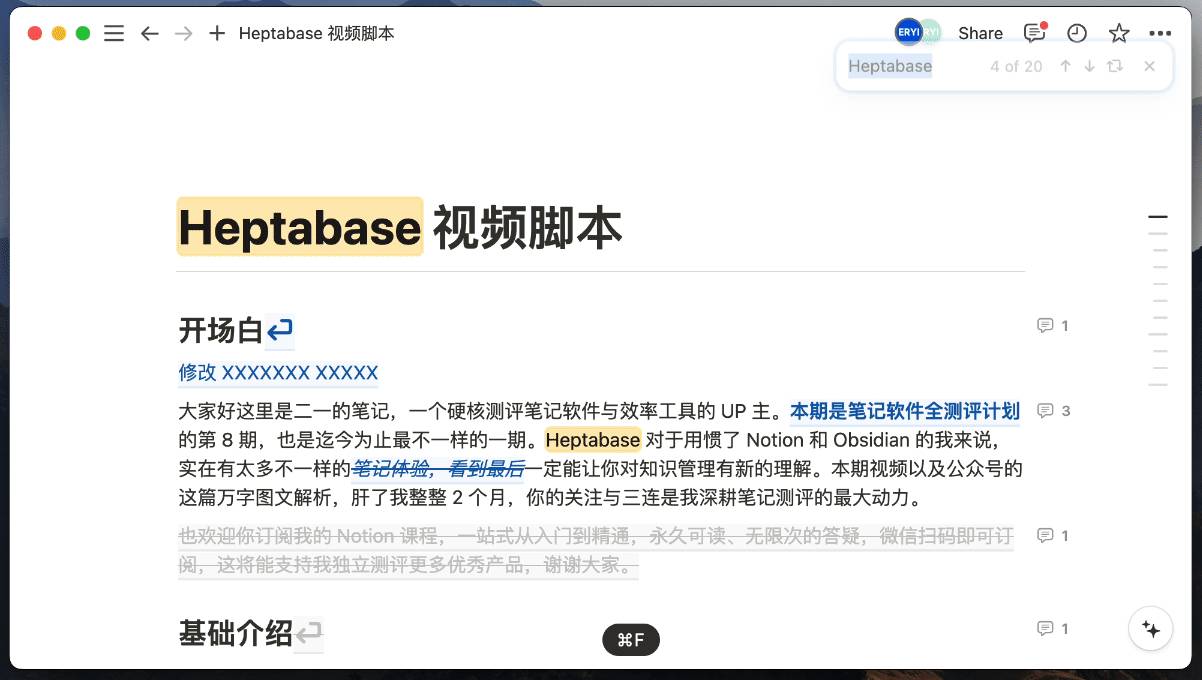
New Find and Replace
Notion has launched a new in-page search feature, accessible with Ctrl+F. The in-page search experience is now much better, and it finally supports find and replace.
Suggest Edits
Notion has introduced the Suggest Edits feature. When enabled, all edits are tracked and displayed in collaborative editing scenarios, similar to the review mode in Word. Simply click the three dots in the top-right corner of the page and enable Suggest Edits.
New Keyboard Shortcuts
The Ctrl+T shortcut in Notion now not only lets you quickly search for notes but also create new note pages directly, making keyboard-only workflows much smoother.
Notion AI Updates
Notion AI now supports searching conversations in Slack. Slack is a widely popular workplace communication tool, and Notion and Slack have always had a very close partnership.
According to Notion, Notion AI will support searching across even more apps in the future, including Google Drive, GitHub, Salesforce, Atlassian, and more.
Notion Price Increase
The Plus plan will increase from $10 per month to $12 per month.
Existing Plus users can renew for one year at the current price before September 30, 2024. After October 1, the new pricing will apply.
If you add it all up, the full Notion experience going forward will cost quite a bit per year: Plus $120 + AI $96 + Notion Sites $96 = $312.
Of course, not everyone needs to subscribe to all these features — just pick what you need. As long as Notion doesn't cut back on the free plan, it remains an excellent and highly competitive product.
📘 FLO.W — Notion Personal Management System
FLO.W is a Notion-based personal management template that integrates tasks, notes, projects, habits, and more, complete with comprehensive tutorials.