This question comes from a reader of the Notion course. It has been organized and shared here. If you encounter similar issues while using Notion, feel free to leave a comment.
Reader's Question
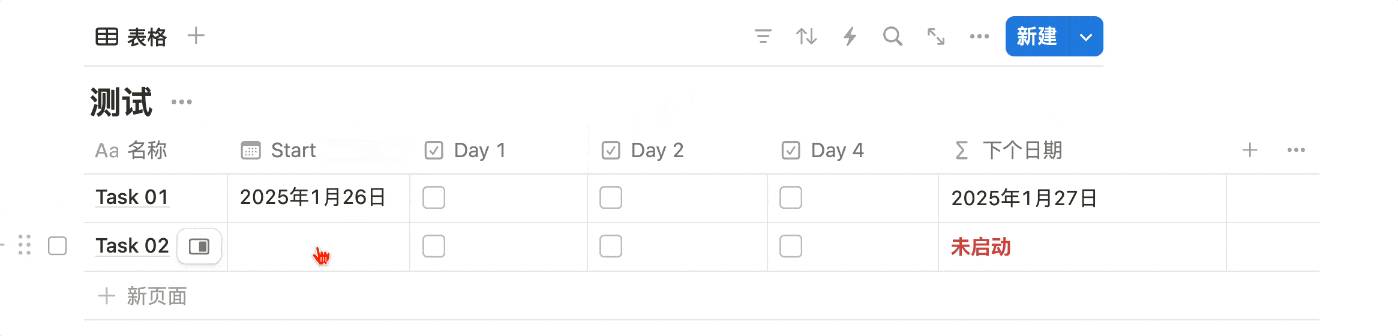
Hi, I'm wondering why only the first condition is showing results (if "start" has a value, add one day). The subsequent compound conditions don't seem to work (if start and day1 both have values, add 2 days, and so on). Why aren't the compound conditions working?
My Answer
First, the best way to check whether a field is empty is to use the empty() function. When a field is empty, empty("Property XX") returns true. For example:
Using this feature, we can construct a formula like this to meet your needs:
if(
    prop("Start").empty()==true,"未启动".style("b","red"),

    lets(
    a,if(prop("Start").empty()!=true,1,0),
    b,if(prop("Day 1").empty()!=true,1,0),
    c,if(prop("Day 2").empty()!=true,2,0),
    d,if(prop("Day 4").empty()!=true,4,0),
    e,a+b+c+d,
    dateAdd(prop("Start"),e,"days")
)

)
Here's the result in action:
Formula Breakdown
The lets function defines the following variables internally:
a = if(Start is not empty, return 1, return 0)
b = if(Day 1 is not empty, return 1, return 0)
c = if(Day 2 is not empty, return 2, return 0)
d = if(Day 4 is not empty, return 4, return 0)
e = a + b + c + d (sum of all values above)
The last line:
dateAdd(prop("Start"), e, "days")
- Starts from the Start date
- Adds the value of e
- Unit is days
Reference Template
- Reference template link: https://leon21.notion.site/Notion-checkbox-1870e68aa04680c98925c3abe0bbc2fa
Related Reading
- Notion Formula Basics (Part 1): Understanding Formula Fundamentals Through Arithmetic Operations
- Notion Formula Basics (Part 2): Mastering Flexible Check-in Tracking and Date Interval Calculations
- Notion Formula Basics (Part 3): Complex Logic and Custom Progress Bars
- A Deep Dive into Notion Formula 2.0: 10+ New Features and Functions That Make Notion More Powerful
📘 FLO.W — Notion Personal Management System
FLO.W is a Notion-based personal management template that integrates tasks, notes, projects, habits, and more, complete with comprehensive tutorials.