LogoFLO.W
  • Pricing
  • Blog
  • Docs
  • Thinking
  • About
Get Started
  • Reader's Question
  • My Answer
  • Step 1: Create a Relay Database
  • Step 2: Set Up a Rollup Field
  • Step 3: Create a Filter Formula
Notion 问答·
2025/02/23

How to Automatically Match Text Fields with Relation Pages in Notion

Use a relay database and Rollup fields to automatically match text input with related pages in Notion.

avatar for 二一
二一
How to Automatically Match Text Fields with Relation Pages in Notion

This question comes from a reader of the Notion course. It has been organized and shared here. If you encounter similar issues while using Notion, feel free to leave a comment.

Reader's Question

Hi, I'd like to ask about an operation in Notion. My database has two fields: A1 (text) and A2 (a Relation property linked to another database). Is it possible that after I fill in the A1 field, A2 automatically matches the content I entered in A1? For example, if I type 20250223 in A1, can A2 automatically search its linked database for a page titled 20250223 and match it?

My Answer

First, it's important to clarify that the Relation property does not have built-in automatic matching capability. You'll need a workaround to achieve this. Let me demonstrate the result first.

In the example below, I'll type 20270809 in the "Text Field" of Database 01 to match the page titled 20270809 in Database 02:
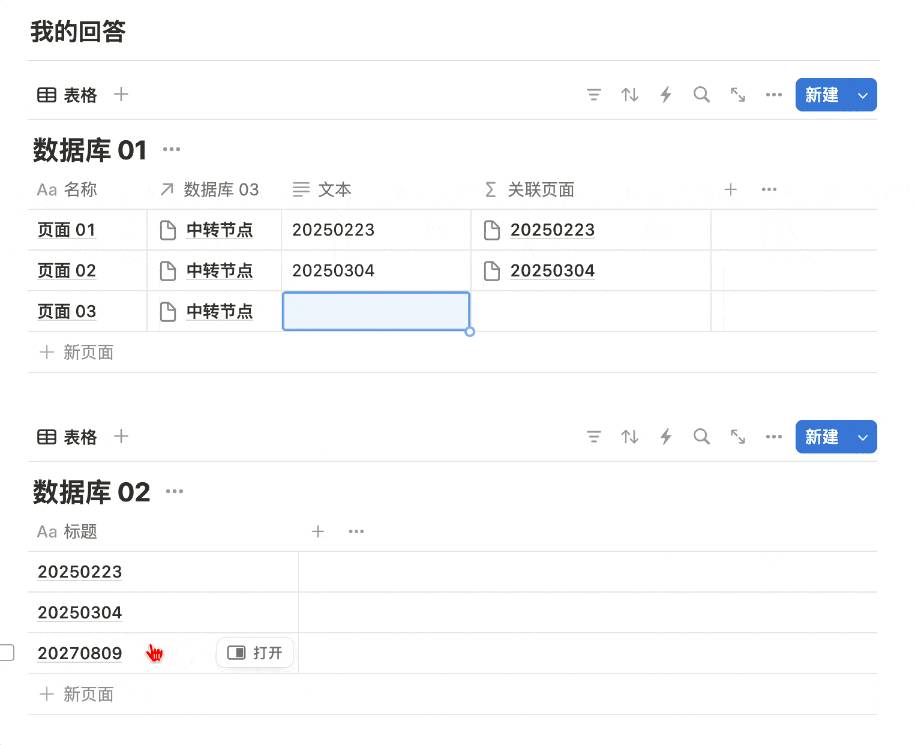
Demo of automatic text-to-relation matching

Here are the detailed steps.

Step 1: Create a Relay Database

  1. Name this relay database "Database 03" and create a single page inside it called "Relay Page."

Create a relay database

  1. Set up a default template for both "Database 01" and "Database 02." When a new page is created in either database, this template will automatically activate and link the new page to the "Relay Page" in "Database 03."

Set default template to link to relay page

This way, all pages in Database 01 and Database 02 will be linked to this "Relay Page."

Step 2: Set Up a Rollup Field

In "Database 01," create a Rollup field that displays all the pages from "Database 02" linked through the "Relay Page."

Set up a Rollup field

Step 3: Create a Filter Formula

In "Database 01," create a Formula:

Rollup.filter(current.Title.format()==Text)

Now, when the text you enter in the text field of "Database 01" matches a page title in "Database 02," that page will appear in this Formula field.

Formula filtering relation results


📘 FLO.W — Notion Personal Management System

FLO.W is a Notion-based personal management template that integrates tasks, notes, projects, habits, and more, complete with comprehensive tutorials.


Ready-to-use Notion template system
Complete tutorials included, beginner-friendly
Continuously updated and maintained
Learn About FLO.W Template✨ 1237+ users chose FLO.W
2025/02/23
Share this post
All Posts

More Posts

How to Auto-Expand Database Sub-Items in Notion
#Notion 问答

How to Auto-Expand Database Sub-Items in Notion

Solve the issue where Notion database sub-items automatically collapse after every page refresh, by adding a Parent item filter condition to keep sub-items expanded.

2024/04/30
Notion Database Accounting: How to Automatically Update Account Balances
#Notion 问答

Notion Database Accounting: How to Automatically Update Account Balances

Build a simple accounting system in Notion using Relation limits and Formula functions to automatically update asset account balances — no manual maintenance needed.

2025/04/09
How to Import Excel Files into Notion
#Notion 问答

How to Import Excel Files into Notion

Two ways to import Excel files into Notion: creating a new database import and merging into an existing database.

2024/03/15

Newsletter

Join the community

Subscribe to our newsletter for the latest news and updates

LogoFLO.W
TwitterX (Twitter)YouTubeYouTubeBilibiliXiaoHongShuEmail
Product
  • Features
  • Pricing
  • FAQ
Resources
  • Blog
  • Documentation
  • Notion Custom Agent
Company
  • About
  • Contact
Legal
  • Cookie Policy
  • Privacy Policy
  • Terms of Service

Subscribe for more Notion tips and updates

© 2026 FLO.W, All rights reservedNotion is a trademark of Notion Labs, Inc. This is an independent third-party site, not affiliated with or endorsed by Notion.
Featured on Uneed