This question comes from a reader of the Notion course. It has been organized and shared here. If you encounter similar issues while using Notion, feel free to leave a comment.
Problem Background
Although Notion databases have a page load limit, the minimum is still 10 entries, so there is no direct way to display only the last entry:
To achieve this, we need the help of another database and some formulas.
Here is the basic approach:
- Relate all pages (A1, A2, A3, A4, etc.) from Database 01 to a page B in Database 02 (named "Last Updated Entry")
- Create a Formula property in Database 02
- Use a formula to find the most recently updated page
Step 1: Create a Default Template
Since all pages in Database 01 need to be related to the "Last Updated Entry" page in Database 02, we can use a default template to automatically create this relation when a new page is added:
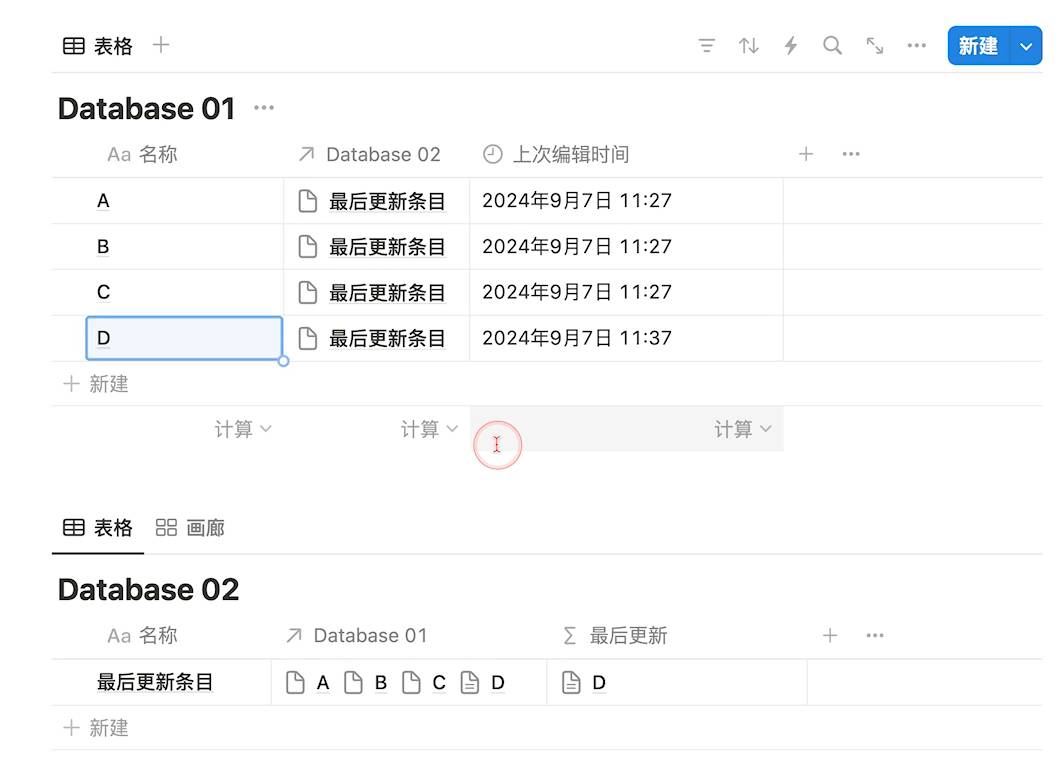
The relation between the two databases looks like this:
Step 2: Process with a Formula Property
Create a Formula property in Database 02 and use the following formula:
Database 01.map(current.Last edited time).sort().reverse().slice(0,1).map(lets( lastTime,current, lastPage,Database 01.find(current.Last edited time==lastTime),lastPage ))Here is a detailed breakdown of the formula:
prop("Database 01")— Retrieves all pages from the database named "Database 01", returning a list of all pages..map(current.prop("Last edited time"))— Iterates through each element in the list and extracts the "Last edited time" property from each page, resulting in a new list of all edit times..sort()— Sorts the time list in chronological order (oldest to newest)..reverse()— Reverses the list order so it goes from newest to oldest..slice(0,1)— Keeps only the first element in the list, which is the most recent edit time..map(lets(…))— Uses the map function again, combined with the lets function to define and use temporary variables:lastTime, current: Assigns the most recent edit time to the lastTime variable.lastPage, prop("Database 01").find(current.prop("Last edited time")==lastTime): Finds the page in "Database 01" whose last edited time matches lastTime, and assigns it to the lastPage variable.lastPage: Finally returns this most recently edited page.
Final Result
Here is the formula in action — when you edit a page, Database 02 automatically displays the most recently edited page:
This approach also has a variant application: auto-updating account balances in an accounting scenario, which similarly uses Relation constraints to achieve the "show only the latest data" effect.
If you switch to gallery view, you can embed it in a column layout for a cleaner look:
📘 FLO.W — Notion Personal Management System
FLO.W is a Notion-based personal management template that integrates tasks, notes, projects, habits, and more, complete with comprehensive tutorials.