Notion Adds Number Formatting for Rollups
When you used Rollups to summarize budgets, revenue, or progress percentages, the result often appeared as a plain number. To show dollars, euros, percentages, or a specific number of decimal places, you often had to add an extra formula.
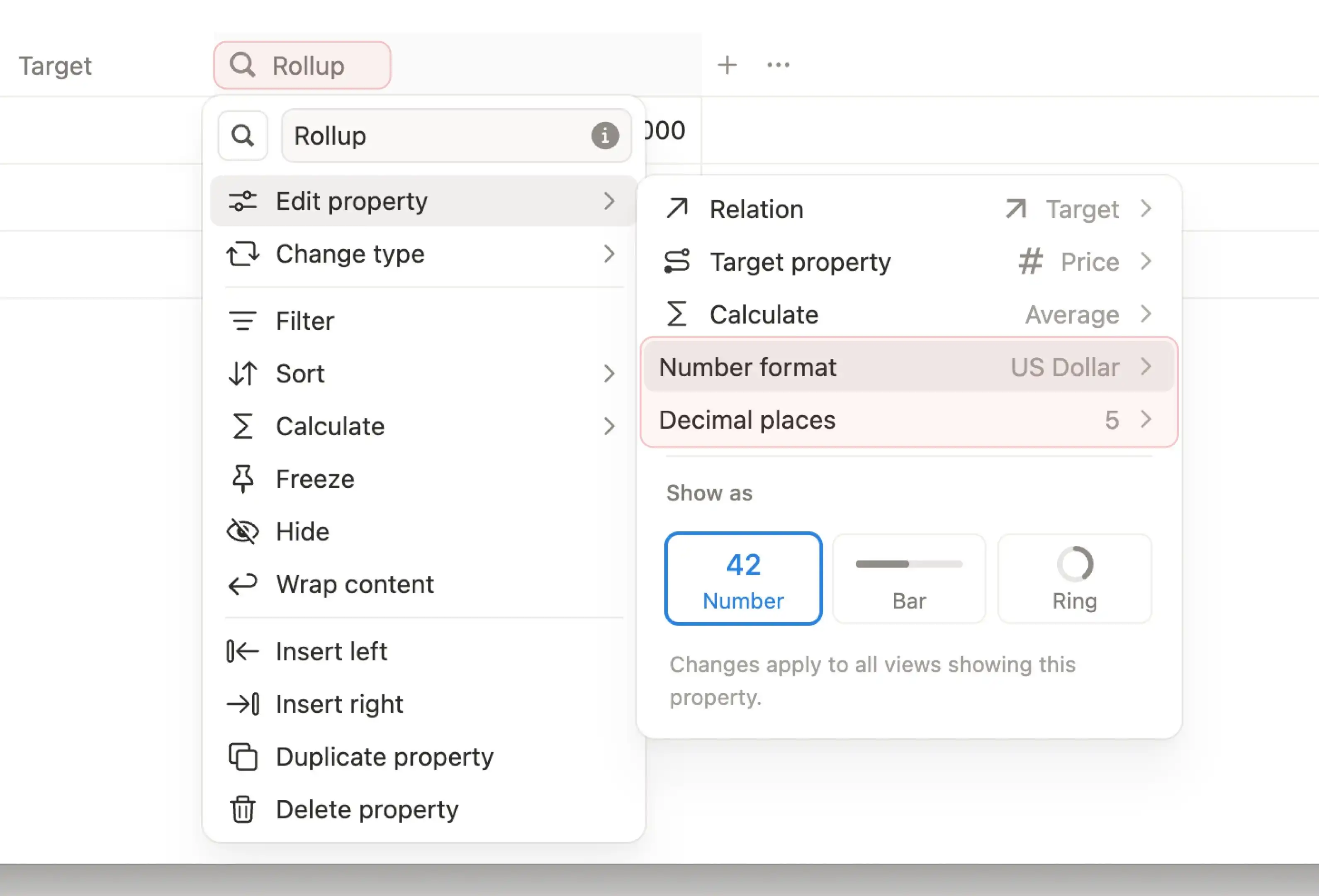
Notion rollups can now set number formats and decimal places directly. Open a Rollup property in a database, go to "Number format" and "Decimal places" in the property settings, then choose formats like US Dollar, Euro, or Percent and control how many decimal places to keep.
This is useful for budget tables, sales summaries, and project progress databases. Together with the earlier Dashboard view, rollup results can go straight into an overview page without extra formulas just for display formatting.
A complete, ready-to-use Notion personal system
If you don't want to spend dozens of hours figuring out database relations and workspace layouts from scratch, FLO.W is a refined, all-in-one Notion template system designed for tasks, projects, and knowledge management.
Related Updates
- Notion Buttons Can Now Send Prompts to Agents, Running Workflows in One Click
- Notion Rebuilds Synced Databases with Real-Time Data from GitHub, Jira, and Salesforce
- Notion Upgrades Version History with Real-Time Edit Highlights and Row-Level Database Changes
- Notion Adds Property-Level Access Permissions for Database Columns
- Notion Adds Custom Database Tab Display Options