 FLO.W Docs
Area Organization
Master areas in the FLO.W Notion template: apply the PARA method, define primary and secondary domains, and organize work and life into a balanced structure.
This document will help you understand the Area concept in the FLO.W Template and learn how to divide and manage different work and life Areas. In the previous tutorials, whether it's tasks, notes, or projects, they're all relatively intuitive, concrete, and common concepts, but the Area concept that follows is not as common and easy to understand, so it may require some patience and thought from you.
Note: The Area concept comes from Tiago Forte's PARA methodology.
Area Basic Structure
First, we can simply and crudely understand Areas as larger folders, which are collections of a series of Projects. That is, in the FLOW system, their hierarchical structure is like this:
However, in long-term practice, I've found that Areas themselves must continue to be subdivided to better associate with Projects. I'll explain the specific reasons in other tutorials. For now, please remember that in the FLOW system, their hierarchical structure is like this:
Below are some reference cases:
| Area | sub-Area | Project | Task |
|---|---|---|---|
| Channel Operations | Bilibili | Create Notion Review Video | Write draft |
| Record audio | |||
| Shoot | |||
| Edit | |||
| Upload | |||
| Xiaohongshu | Create Notion Graphic Posts | Topic planning | |
| Write graphic content | |||
| Create cover image | |||
| Publish and engage | |||
| Create Lifestyle Scenario Note Posts | Collect lifestyle materials | ||
| Create template screenshots | |||
| Write copy script | |||
| Publish and track data | |||
| Programming Skills | Backend Development | Develop Payment API for E-commerce Site | Design order Database model |
| Implement Alipay interface integration | |||
| Write API documentation | |||
| Complete unit testing | |||
| Data Analytics | Analyze Q2 2025 User Purchase Behavior | Clean June sales data | |
| Generate user persona report | |||
| Create interactive sales charts | |||
| Submit decision proposal | |||
| Health Management | Physical Training | Complete 2025 Half-Marathon Training Plan | Wednesday 5km run training |
| Buy suitable running shoes and gear | |||
| Create nutrition supplement plan | |||
| Participate in July 15 city half-marathon race | |||
| Diet Adjustment | Implement Low-Carb High-Protein Diet Plan | Create weekly meal plan | |
| Prepare healthy snack alternatives list | |||
| Learn 3 high-protein low-calorie recipes | |||
| Record daily diet log and analyze | |||
| Family Life | Parent-Child Relationship | Cultivate Child's Reading Habits | Read 20 minutes before bed |
| Take child to library once | |||
| Set up age-appropriate bookshelf for child | |||
| Participate in July parent-child reading club event | |||
| Home Environment | Create Efficient Home Workspace | Organize study space and add necessary furniture | |
| Set up comfortable lighting system | |||
| Organize file storage system | |||
| Buy ergonomic chair and desk |
Area Definition
How to Define Areas
When establishing your Areas, I usually suggest starting with "few", focusing on 3-5 sections you value most. Don't stuff everything into the system from the start, as it can easily make you feel lost. Observe what you've been spending time on recently - those things you continue to invest energy in daily or weekly are likely your most real and active Areas.
Of course, we don't just look at the present, but also anticipate where you hope to grow, maintain, or improve in the next 1-3 years, because the essence of Areas is systematic maintenance zones serving the long term. For naming, suggest using nouns or gerunds, like "Health Management" or "Content Creation", rather than one-time goals like "Lose Weight Successfully" or "Finish a Book". Maintaining an open, continuous state is very important.
Also confirm whether there are really responsibilities and actions in this Area that need long-term maintenance - if it's just a vague idea, or there's no clear investment plan yet, then it might just be a future Project, not a current Area. As for how to classify, there's no fixed answer. Some like to separate work and life, others prefer to integrate them into capability or identity modules. The key is what feels clear and natural to you.
You can also reference the common six categories: health, wealth, career, relationships, learning, leisure, but don't forget to combine with your reality and transform them into expressions close to your life. Areas aren't set in stone - they should flexibly change with your life rhythm, constantly being adjusted, reduced, or renamed. Don't worry too much about defining them perfectly at the start. Use them first, then let them gradually take shape through action and review.
How to Define sub-Areas
When you've clarified your Areas, the next step is to break them down into reasonable sub-Areas. The core of this step is to "cut" large responsibilities into smaller pieces, but not arbitrarily - rather, based on different roles you play in that Area, different strategies you adopt, or specific affairs you face as clues to divide into several relatively independent small blocks.
If your Area is "Channel Operations", you might divide into sub-Areas like "Bilibili", "Xiaohongshu", "Official Account" by platform; under "Health Management", you can set "Physical Training" and "Diet Adjustment"; in "Programming Skills", it might be subdivided into "Backend Development" and "Data Analytics".
In my practice, sub-Areas are actually the main battlefield of your daily work and life, because they will directly associate with Projects.
How to Create Areas
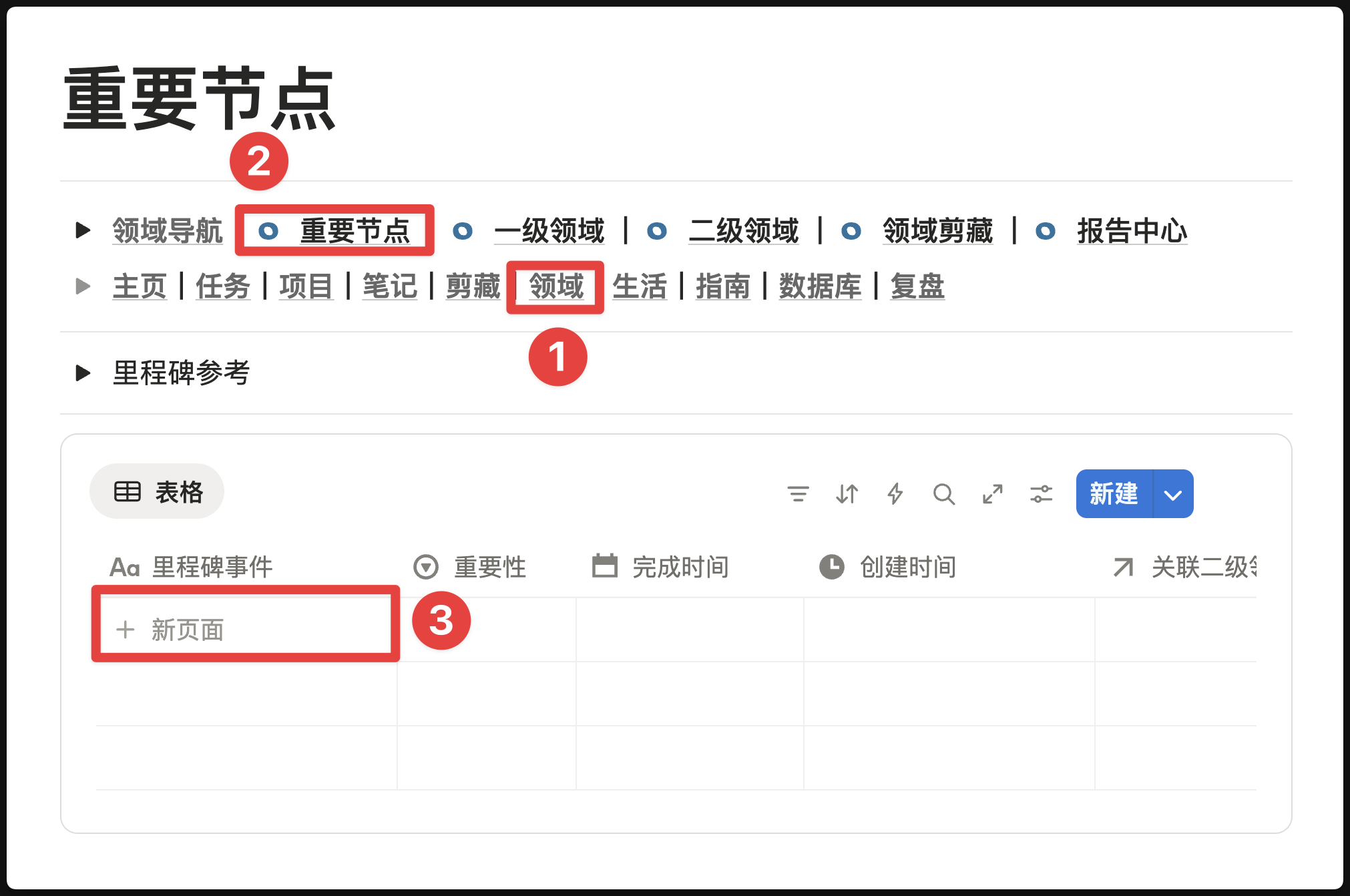
Create Area Milestone
Feature Location
As shown in the image below
Design Logic
What problem does this feature solve?
In the process of long-term deep dive in an Area, we easily fall into a state of "only keeping our heads down working, not looking up to see the road" - completing tasks and advancing projects every day, but rarely stopping to celebrate our phased achievements. Over time, this creates a sense of confusion of "seemingly always working hard, but not knowing how far we've actually gone".
The design intention of "Milestone" is to establish a growth monument for each sub-Area. It doesn't record daily trivial tasks, but those milestone events worth remembering - such as "Bilibili followers exceed 10,000", "Complete publication of first book", "Obtain certain professional certification".
Relationship with other features
- Relationship with sub-Area: Milestones are precisely anchored to specific subdivided directions through the "Relate to sub-Area" Property. This gives each Milestone a clear attribution, making it convenient to review growth trajectory by Area later.
- Difference from Projects: Projects are "ongoing battles" with clear beginnings and ends; while Milestones are "earned badges", frozen records of certain achievements. The achievement of a "Milestone" may depend on the successful completion of multiple Projects.

Common Misconceptions Clarified
- ❌ Misconception: Milestones should record all completed things
- ✅ Correct: Only record those phased achievements truly worth celebrating, maintaining scarcity preserves the sense of ritual
Applicable Scenarios
- Achieved quantifiable achievements in an Area (follower count, income, work count)
- Completed an important "first time" (first public speech, first paying client)
- Received external recognition (certificates, awards, media coverage)
- Reached self-set phased goals
Usage Suggestions
- Recommended to review the Milestone list at least once a month - this is an effective self-motivation method
- When creating Milestones, take the opportunity to write down "how I did it" in the page - these review contents have high future value
- Can set calendar view to review your growth trajectory in timeline format
Last updated on
Project Management
Distinguish tasks from projects in FLO.W Notion template: visualize progress, refine your methodology through reviews, and say goodbye to chaotic goal tracking.
Web Clipper
Set up the web clipper in the FLO.W Notion template: install Save to Notion, fix sync and property mapping issues, and collect web content efficiently.