Notion Launches Agent Model Controls
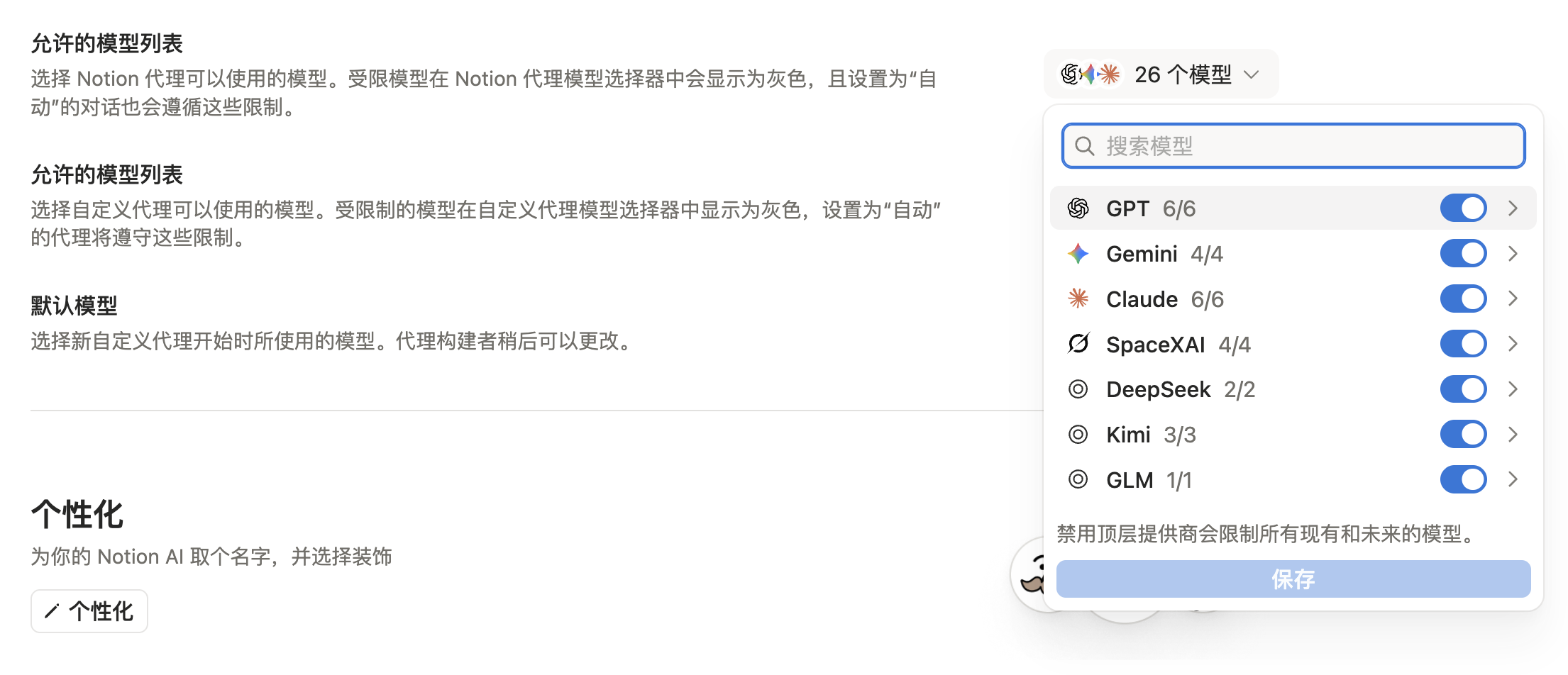
As more models show up in the picker, anyone on the team can switch to a more expensive option, or a provider the workspace has not reviewed yet. Workspace owners can now set allowed models for Notion Agent and Custom Agents separately, and pick a default model for newly created Custom Agents. That default can still be changed later in the builder.
Go to Settings → Notion AI → General → Model controls. Restricted models appear grayed out in the picker, and conversations set to Auto follow the same list. Turning off a provider blocks both its current models and any it adds later.
The current settings page lists GPT, Gemini, Claude, SpaceXAI, DeepSeek, Kimi, and GLM. After Custom Agents launched and Kimi K2.6 joined the picker, this update is about the workspace-level roster.
A complete, ready-to-use Notion personal system
If you don't want to spend dozens of hours figuring out database relations and workspace layouts from scratch, FLO.W is a refined, all-in-one Notion template system designed for tasks, projects, and knowledge management.
Related Updates
- Notion Buttons Can Now Send Prompts to Agents, Running Workflows in One Click
- Notion Rebuilds Synced Databases with Real-Time Data from GitHub, Jira, and Salesforce
- Notion Upgrades Version History with Real-Time Edit Highlights and Row-Level Database Changes
- Notion Admins Can Set Default Sidebar Presets for New Members
- Notion Adds Selectable Models: Claude Sonnet 5.5, Haiku 5.5, Fable 5 / 5.1 and GPT-6.1 Sol