LogoFLO.W
  • Pricing
  • Blog
  • Docs
  • Thinking
  • About
Get Started
  • Problem Background
  • Solution
  • Method 1: Using Notion Database Automation
  • Method 2: Using a Notion Database Button
Notion 技巧·
2025/01/10

Notion Database Automation Tips: Auto-Inherit Parent Page Relation Properties in Sub-Items

Two Notion database automation methods explained: let sub-items automatically inherit parent page Relation properties to boost efficiency and reduce repetitive work.

avatar for 二一
二一
Notion Database Automation Tips: Auto-Inherit Parent Page Relation Properties in Sub-Items

Problem Background

Notion databases have a feature called sub-items, which lets you create a tree-like hierarchical structure within a database.

Notion sub-items feature illustration

However, when creating sub-items, they cannot automatically inherit the Relation properties from the parent page. You have to manually select them each time, which is quite tedious.
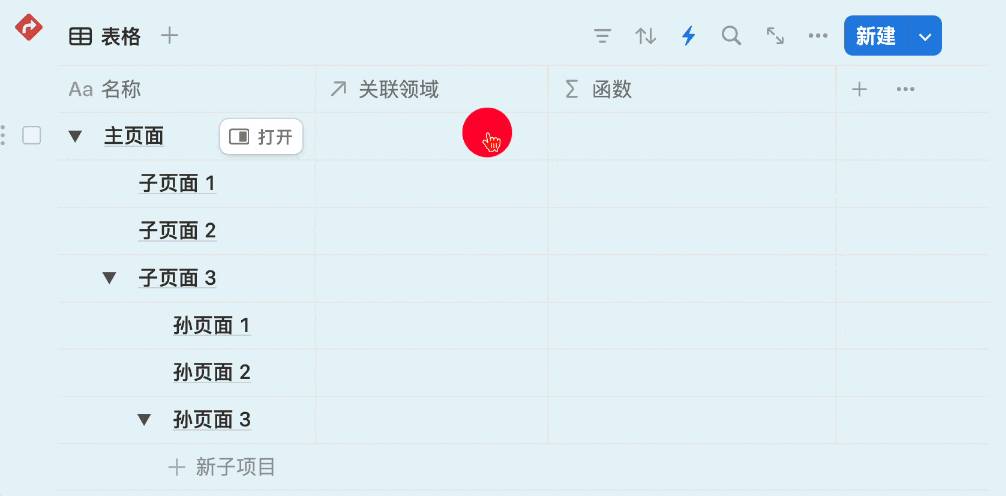
Sub-items cannot auto-inherit relations

So is there a way to make sub-items automatically inherit the parent page's Relation properties when they are created?

Solution

Method 1: Using Notion Database Automation

Trigger

Select "Page added" as the trigger.

Select Page added as trigger

Define Variables

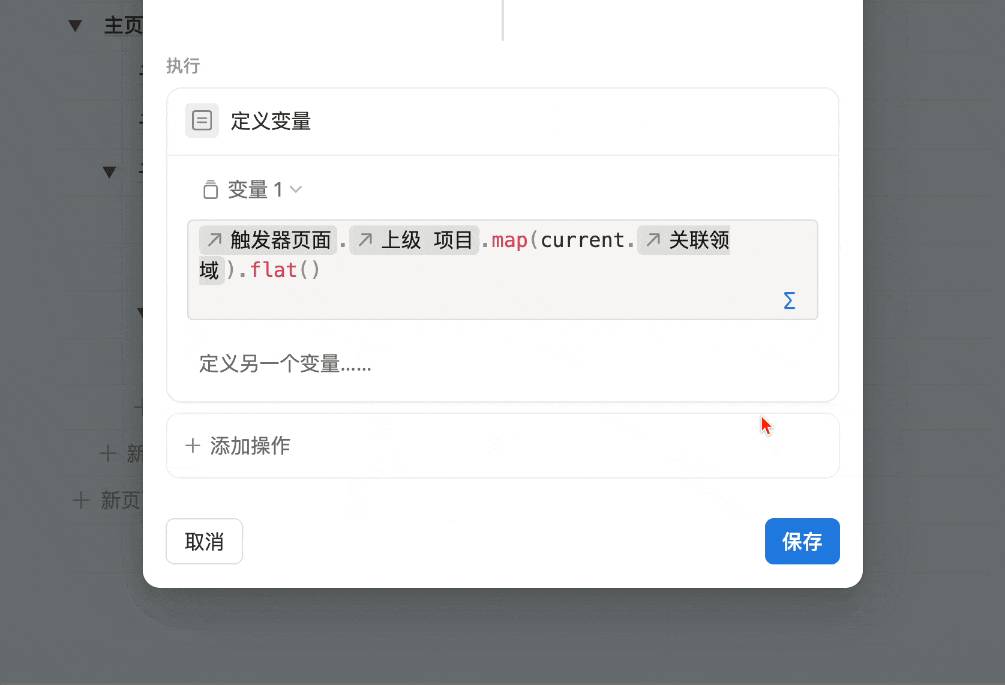
Define a "Variable 1" and assign the sub-item's "parent item's Relation" value to this variable:

Variable definition settings

Execute Action

  1. Edit page properties
  2. Select the Relation property
  3. Choose "Variable 1"

Execute action demo

Final Result

When creating sub-items, they will automatically inherit the parent item's Relation values.
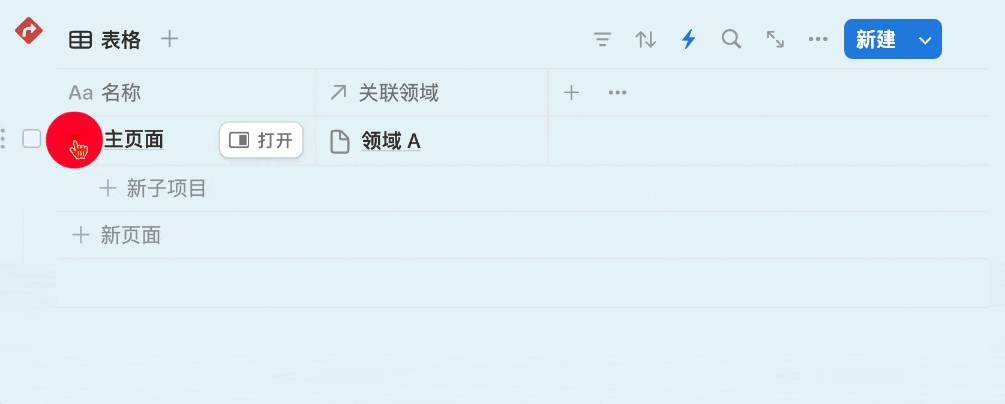
Auto-inherit effect demo

Method 2: Using a Notion Database Button

Method 1 is fully automatic — it runs whenever a sub-item is created. But sometimes you may not want this process to be entirely automated.

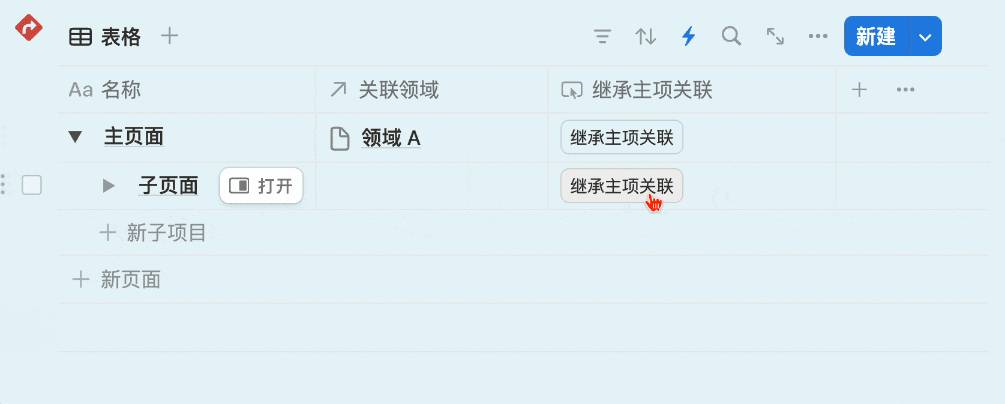
In that case, you can create a database page button. The variable settings are the same as Method 1, except the trigger changes to "When button is clicked."

Database button settings

The result looks like this:

Button trigger effect demo


📘 FLO.W — Notion Personal Management System

FLO.W is a Notion-based personal management template that integrates tasks, notes, projects, habits, and more, complete with comprehensive tutorials.
Ready-to-use Notion template system
Complete tutorials included, beginner-friendly
Continuously updated and maintained
Learn About FLO.W Template✨ 1237+ users chose FLO.W
2025/01/10
Share this post
All Posts

More Posts

Free Collection of 1000+ Notion Database Covers
#Notion 技巧

Free Collection of 1000+ Notion Database Covers

Free download of over 1000 Notion database cover images featuring 10+ Chinese font styles, perfect for life, study, work, and entertainment categories.

2025/01/05
Notion + DeepSeek: Record Voice Notes with Shortcuts
#Notion 技巧

Notion + DeepSeek: Record Voice Notes with Shortcuts

Use iPhone Shortcuts with DeepSeek API to transcribe voice into text and automatically save it to a Notion database for efficient voice note-taking.

2025/07/18
Notion Public Blog Index — Eryi's Notion Public Resource Collection
#Notion 技巧

Notion Public Blog Index — Eryi's Notion Public Resource Collection

A curated index of Eryi's Notion public pages, including Notion Chinese localization, note collections, templates, courses, and Formula tutorials for quick access.

2024/02/28

Newsletter

Join the community

Subscribe to our newsletter for the latest news and updates

LogoFLO.W
TwitterX (Twitter)YouTubeYouTubeBilibiliXiaoHongShuEmail
Product
  • Features
  • Pricing
  • FAQ
Resources
  • Blog
  • Documentation
  • Notion Custom Agent
Company
  • About
  • Contact
Legal
  • Cookie Policy
  • Privacy Policy
  • Terms of Service

Subscribe for more Notion tips and updates

© 2026 FLO.W, All rights reservedNotion is a trademark of Notion Labs, Inc. This is an independent third-party site, not affiliated with or endorsed by Notion.
Featured on Uneed