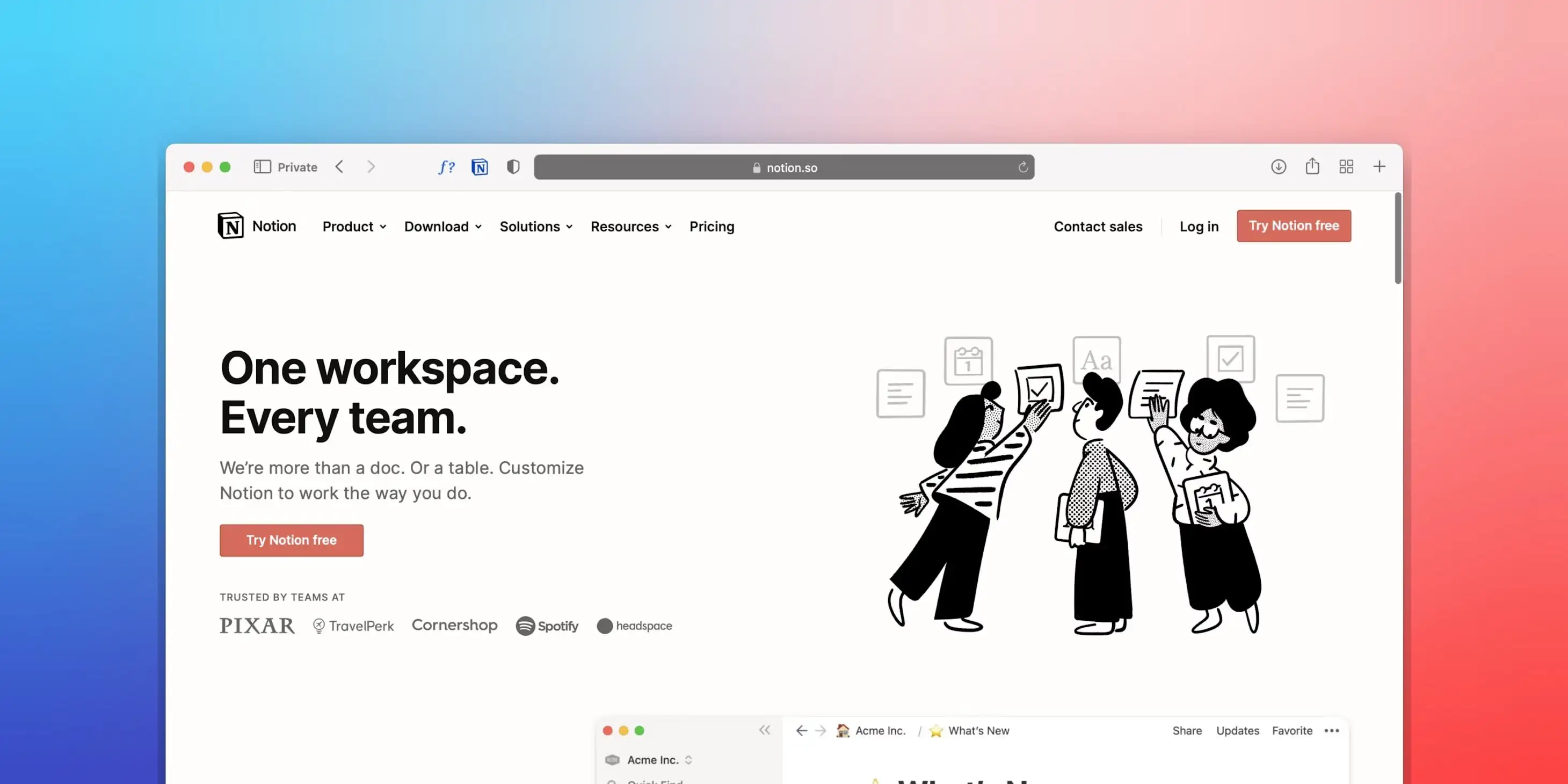
Two years ago, I wrote "A Decade of Notion's Evolution" (link in Chinese), attempting to summarize this tool. Looking back today, it feels somewhat awkward - over ten thousand words that can barely capture one-tenth of Notion's current capabilities. In these two years, Chinese mode launched successfully, databases received comprehensive enhancements, AI capabilities deepened further, Agent mode is rolling out, bringing entirely new automation possibilities, and offline mode - that long-discussed final hurdle - may well be resolved within this year.
As a seven-year user, I've witnessed Notion's journey from niche tool to productivity giant, and I'm filled with emotion. So today I want to share with you why, after producing so many note-taking app reviews (link in Chinese), Notion has become my most frequently used note-taking tool. Beyond sharing my Notion insights, this article will also introduce the design philosophy behind a paid Notion Template.
Why Choose Notion
The Freedom to Design Processes
All automated workflows that can silently produce in the background hold infinite appeal for me.
I love watching factory canning assembly lines, tinkering with automation in Dyson Sphere games, and enjoying the passive growth that long-tail video traffic brings - though modest, it's something. Often, once you've laid the necessary groundwork, you simply start the machine and let it run patiently. The harvest will come naturally, and this feeling is wonderful.
And Notion can become such an automated workflow assembly machine in the dimensions of thinking, creating, and managing. Moreover, all features work out of the box - you don't need to tinker with any third-party tools, nor worry that it will lose plugin maintainer support years down the line.
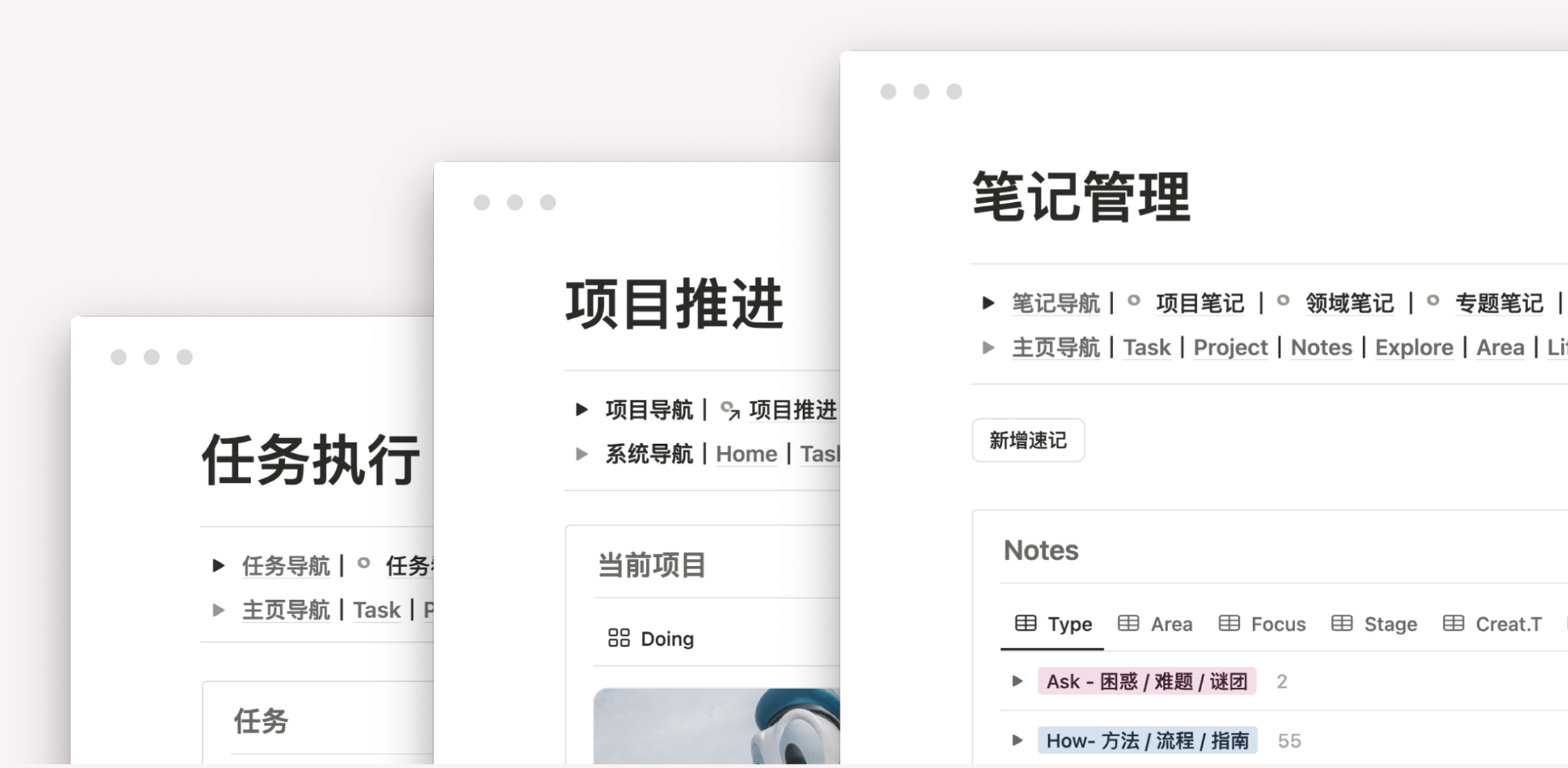
Based on Notion's synced block features, intelligent filtering of database mirrored views, workflow assembly of automation modules, and automatic calculation of formula fields, I can build extremely rich and diverse automated workflows in Notion, taking it far beyond what ordinary note-taking software can define. With the launch of Custom Agent, these automation capabilities have gone even further — Agents can now run on a schedule in the background, enabling truly unattended workflows.
Strictly speaking, Notion is not note-taking software - it's actually a tool for creating tools.
As long as your interaction objects are text, audio/video, or data, Notion has ample capability to create and simulate matching processes, tools, or even Apps. In a remarkably concise and straightforward way, it hands me the freedom to design processes: create blocks, drag to assemble, complete the design.
If you have some tinkering and research ability, Notion's relations and formula fields can also design diverse personalized reports, and formula fields don't require a paid subscription - free users can use them without restriction.
Of course, as a cloud product, Notion's biggest issue is that before offline mode arrives, all functionality depends on network connectivity.
You must be concerned: what's the reliability of building your "factory" in someone else's house? If "traffic jams" might prevent you from even returning home, why seek trouble?
So my view is all choices involve weighing pros and cons. At least before Notion launched in China, its access speed varied by person. I can neither convince you nor convince myself that Notion is a cloud tool that will absolutely never lose data, but I'm willing to believe that as a multi-billion dollar enterprise still growing rapidly, Notion's safety redundancy is sufficient to offset my data security concerns.
Perspective Brings Security
If you, like me, have an irresistible preference for "orderliness" and fear of "chaos," if the external world is unpredictable to you - tasks emerge suddenly, inspiration flashes by, plans get disrupted at any moment - if this uncertainty is the root of your anxiety, then in Notion's databases, everything can be organized, planned, and quantified, which to me is a great comfort.
Because view is perspective, and only perspective can find focus from chaos.
Obsidian or Logseq are indeed excellent thinking tools, but they primarily let information flow through "text + hyperlinks," radiating from center to periphery on a two-dimensional plane. So for me, their problem is the lack of convenient perspective capabilities - requiring very circuitous methods to勉强 approach Notion database's smart views effect.
These two bi-directional linking note tools can help you draw a "subway route map" - every station is clear, connections between stations are explicit; Notion can help you build a "city traffic real-time monitoring system" with countless conveniently dispatchable monitoring probes - that is, database views.
You can achieve:
-
Only view crowded stations on Line 1 today
-
Sort all transfer stations by passenger flow
-
Automatic popup warning when passenger flow exceeds threshold
This ability to filter, perspective, slice, and automatically respond to the same dataset from different dimensions and conditions is Notion's killer feature, and one of the important reasons I've found it irreplaceable over the years.
But Lark (Feishu) Bitable can also tag, filter, screen, and perspective - what's different from Notion?
Bitable's essence is still a spreadsheet - it can only organize and perspective rows and columns where cells reside, unable to achieve "click cell to open page" needs. Notion's functional (block) container is the page, and databases are three-dimensional organization and perspective of pages.
To use an analogy, Notion's database is like a multi-layer bookshelf, where each drawer stores independent pages, and each page can nest new bookshelves (databases), forming an infinitely recursive information structure. Therefore, Lark Bitable and Notion databases are completely different products in user experience.

My Notion Insights
I increasingly feel that among the people swept by "poor students have many stationery," including myself, the "efficiency" we pursue is sometimes a byproduct. I can't tolerate isolated information, delayed feedback, fragmented processes, or separated ecosystems. So what I pursue more is the sense of security that unified order brings, while efficiency improvements are rewards that come after achieving body-mind harmony.
Based on this, I'll combine my seven years of experience with user pain points observed from thousands of reader Q&As in my Notion course (link in Chinese), extracting nine insights. These insights are also the core principles guiding my FLO.W Notion template Template design, hoping this Template helps you build a stable, reliable, friction-free thinking, action, and management framework.
Three Long-Term Strategies
In extensive observations, I found many people fall into similar traps when using Notion - either over-pursuing complex system design or being troubled by trivial details. So I summarized three long-term strategies for using Notion that can minimize the system confusion that easily appears later.
First, Be an Architect, Not an Interior Designer
Architects mainly focus on whether the foundation is stable, load-bearing structure solid, and framework circulation reasonable. Interior designers need to focus more on detail experience, color selection, material selection, and lighting design. Notion newcomers easily slip into the latter role.
At that time, I'd also be obsessed with changing icons, finding exquisite covers, studying color schemes, debugging third-party widgets, trying to decorate Notion into an exquisite little house. Yet it's precisely these so-called "emotional value" elements that continuously erode my attention. All elements tell me "Look, how beautiful this is," rather than "Come, please start working."
Therefore, in my FLO.W Notion template Template design, I don't need to display weather or life countdown in Notes, don't need scrolling photo albums or colorful clocks. I need clear structure and smooth experience more, not decorations that occupy mental bandwidth.
Second, Build Small Houses, Not Skyscrapers
Notion databases and pages' infinite depth easily tempts us to stuff too much into one page.
I once took pride in this, thinking putting all databases on one page and that bottomless feeling when scrolling the mouse was proof of "powerful." But this is an illusion - bloated single pages only bring endless scrolling and visual burden. For example, the image below shows a "one-page" system I built with Notion long ago.
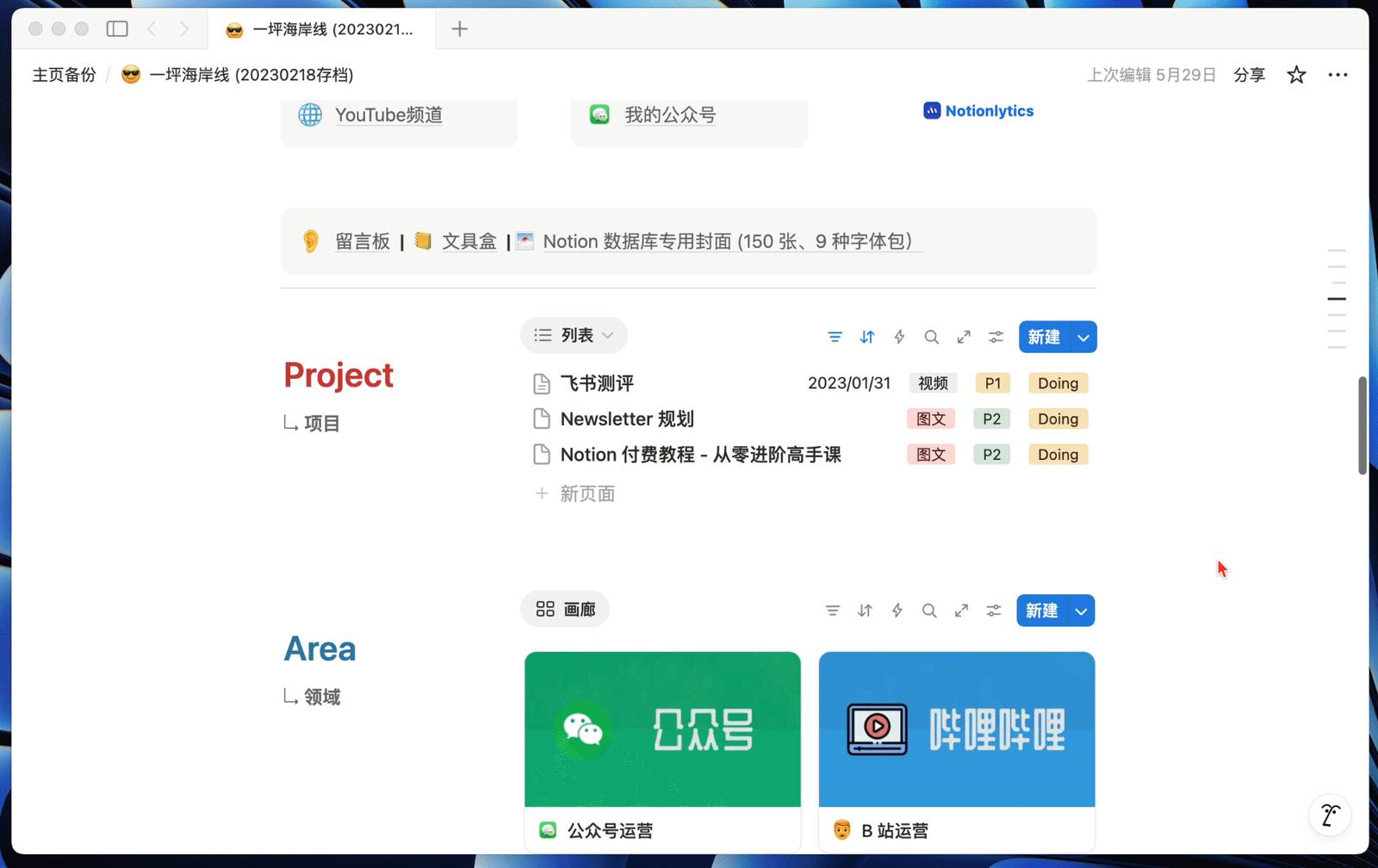
Now I prefer "townhouse" layout, letting each core functional module (Tasks, Projects, Notes, etc.) have its own independent page. This way, even on laptop screens, the mouse only needs to scroll once or twice to completely view all content of the current module.
Meanwhile, using Notion's synced blocks, I built a well-connected top navigation bar within the Template. I can confidently say this is a more efficient navigation method than sidebar directories. You can visit my Template homepage (link) to experience the navigation bar's jump effect.
Third, Embrace the Utility Room, Accept Imperfection
Perhaps you just abandoned some note-taking software and, with determination to start fresh, look to Notion, hoping this time to build a note-taking system perfect enough to never be abandoned.
But in reality, no system can be perfect forever - the more precise, the more easily it loses stability. So whether electronic note libraries or your real desktop, don't demand every place be neatly organized. Allowing some degree of chaos is necessary because entropy increase is inevitable.
So you can appropriately create some Inbox pages for collecting clutter
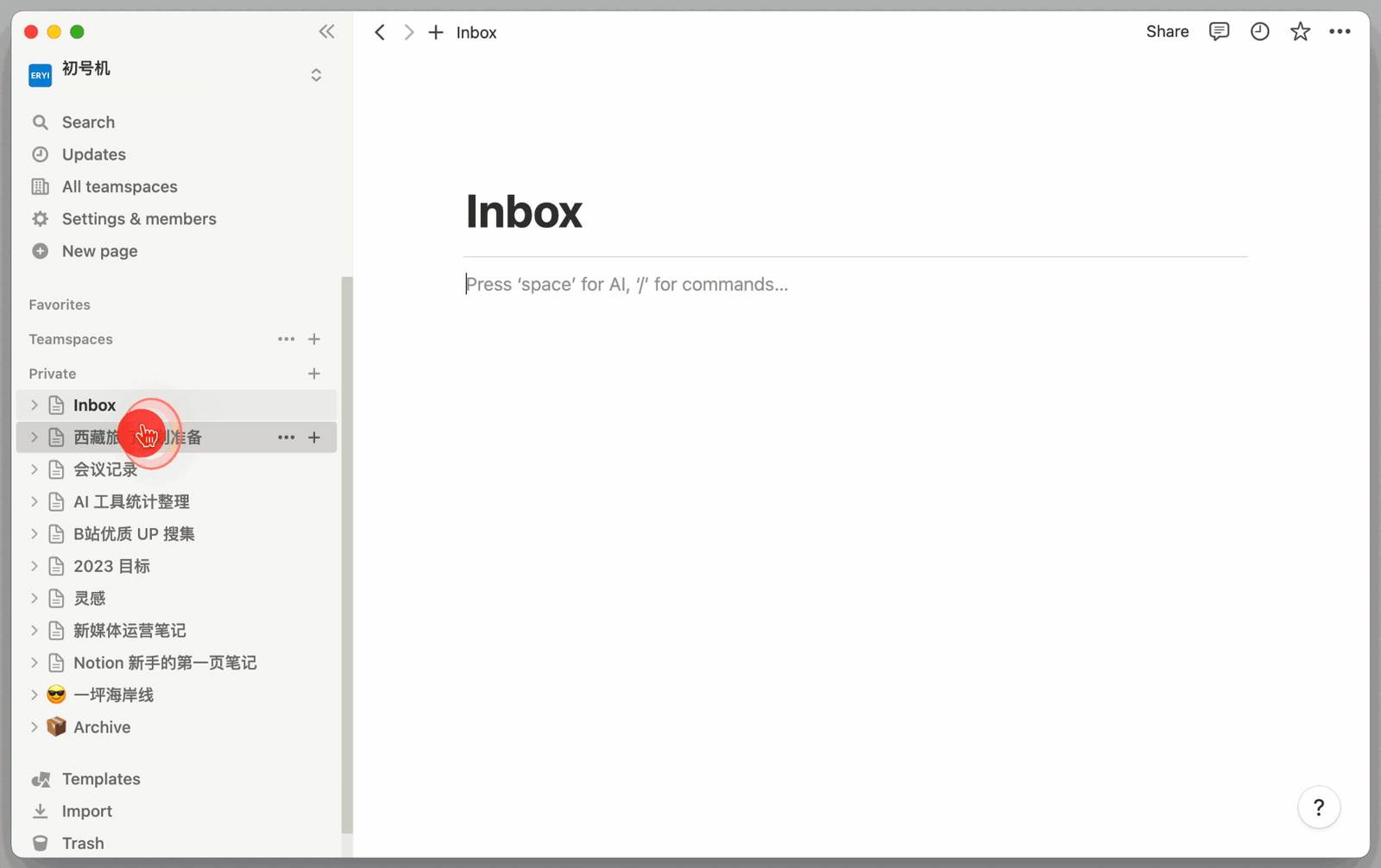
Or create tags like Inbox or Collect for your databases, giving many sudden ideas some buffer room
A good system should appropriately accommodate your chaos, not demand you stay perfect at all times. Most importantly, Notion's Chinese search effectiveness has actually made significant progress - most times I can directly find the Notes I want, so you don't need to worry too much about Notes being unfindable.
Three Load-Bearing Foundations
If a Notion system is like building a skyscraper, then "load-bearing walls" are those core principles whose removal causes the entire system to collapse. In the FLO.W Notion template Template, I designed three such load-bearing foundations that allow a Notion system to run long-term, stably, and without too much pain.
First, Restrained Hierarchy Count
Page and database nested layers are part of Notion's charm, but you can easily get lost in层层叠叠 page jumps. After all, brains aren't computers - too deep paths bring "where am I" navigation anxiety. Only with fixed positions and shallow enough hierarchy can you achieve quick input or quick positioning.
To achieve the goal of "reduce jump count," I only designed three hierarchy levels in the FLO.W Notion template system - from "Home" to any "specific functional module" requires only two clicks. And you can return to Home from any page with one click via the top navigation bar.
This restrained hierarchy design ultimately aims to build an efficient "information filter."
A good system shouldn't spread all information evenly before you. It must present just the right amount of information at the right time, in the right form - not too much to overwhelm you, not too little to prevent decision-making. Reasonable hierarchy structure is the core means to achieve this filtering. By stratifying information, we define priority and visibility at different levels.
So when you start building your own Notion system, I suggest you prioritize thinking not "how much information do I have to put," but "when do I need to see what information."
Based on this thinking, the FLO.W Notion template system's three-layer structure is actually a progressively advanced information filtering system, hoping to provide some reference.
First Layer Home, High-Priority Filter
This layer's purpose is to let Notion automatically filter the few things you need to focus on today, thereby filtering out 90% of secondary information for you.
First, you can select several databases you visit most frequently, such as Tasks database and Notes database, then create mirrored views on Home, add filter conditions to filter the few pieces of information you need to focus on most every morning, such as "Today's Tasks" or "This Week's Notes."
Home design should be sufficiently concise, don't stack too many functional modules, otherwise it will only distract your attention and prolong loading time each time you open it. You can click here (link) to visit my public homepage and experience this first-layer Home effect.
Second Layer Core Modules, Scenario Filter
When you enter any secondary module from Home, such as [Task Management], you activate the second layer of filtering.
I've solidified 80% of usage scenarios in this second layer, ensuring most daily operations complete within two clicks. I suggest you observe your most frequently repeated operations in a week, then set up database view filters in advance - this can greatly improve daily work efficiency.
Third Layer Specific Functions, Personalized Filter
This layer prepares for that 20% of more specific, more segmented needs. When you need to view "all completed but unreviewed tasks" or "overdue tasks for a specific project," you can enter this third layer.
Views here are further filtering and deepening based on second-layer common functions. You can preset more complex, lower-frequency query needs here, without interfering with your daily high-frequency operations by stacking all functions on the surface. Place low-frequency but high-value analysis views here, call them when needed.
From "most important today" to "most commonly used in this scenario," to "what I most want to see right now," this progressively filtering system ensures you only deal with information you currently need at any time. Just set filter conditions in advance, no need to search for that information among dozens of views.
Second, Limited Meta-Information Types
When I first started building Notion workflows as a beginner, I fell into the "showing off" trap, thinking more databases cover more scenarios. Facts prove, database count isn't a system advantage, but a maintenance burden. Each added database means one more set of field rules to understand and maintain, your requirement management becomes managing databases themselves.
So the goal became: how to use as few databases as possible to adapt to as many scenarios as possible?
I think Tiago Forte's PARA methodology's concepts about Areas and Projects are worth learning. But in long-term practice, I found "Resources" definition is vague, while "Archives" is a state not an information type.
So in the FLO.W Notion template system, I set four meta-information types I consider most important:
-
Tasks: The smallest unit driving action, a specific action or event being executed
-
Projects: A collection of a series of "Tasks" initiated to achieve a specific goal
-
Areas: Life goals or aspirations driven by a series of "Projects" requiring long-term cultivation
-
Notes: Reusable, flowable information supporting Tasks, Projects, or Areas operation
More simply: Tasks = Action; Projects = Goal; Areas = Direction; Notes = Ammunition.
Four meta-notes need only four core databases. I can concentrate them in one page, first solving the problem of databases being created too casually, making them hard to find and maintain later.
Next, all other segmented needs can "grow" from these four databases. For example, "Meeting Minutes" and "Flash Ideas" are just "views" of these four meta-databases with specific filter conditions.
So next time you have the thought "this needs a new database to hold," consider: what's the essence of this information? Which meta-information type does it belong to? Is there an existing database that can accommodate it? If adding just one "Select" field option can achieve it, don't create a new database.
Third, Directional Information Association
So far, associations between modules only appear in top navigation bar connectivity. They're still relatively independent data warehouses - you need to open that door, walk in, to see what's stored inside.
But if only this, it doesn't deserve FLO.W Notion template Template's "Flow" name. What I pursue is not just simple point-to-point connections between pages, but an association method with context, direction, conveying more background information.
Its implementation is actually quite simple and crude - use database Relation relation fields.
General bi-directional linking notes are like countless small paths in a city - though well-connected, they lack signpost guidance. Facing many exits, you still get lost. Many links but lack direction.
In the FLO.W Notion template system, because I've defined four meta-notes, associations between different meta-notes automatically carry default roles and intentions - it can be task delegation, or resource invocation.
For example:
-
Task associates Project, clarifying which bigger goal this small thing aims toward
-
Project associates Area, ensuring short-term effort drives long-term development
-
Note associates Area, storing reusable experience in your capability repository
-
Task associates Note, giving immediate action more background information reference
Based on associations, more advanced automated workflows can be achieved, such as:
-
Complete task, project progress automatically updates
-
Associate Note, automatically appears in corresponding task page
-
Add course, automatically create learning project
-
Clip article, automatically archive to corresponding page
This lets information no longer drift aimlessly, but like a messenger with clear goals, rush to designated destinations through associations. When you go from Note to Task, from Task to Project, then from Project link to Area, you can build a clear information flow path, helping you maintain grasp of the big picture in daily work.
Although creating such associations in Notion databases isn't difficult, my suggestion is: first, your database count should be sufficiently streamlined; second, your functional definition of each database should be sufficiently precise. Only when they associate with each other will their roles not be confused, implicit context information sufficiently specific.
And in early construction, definitely don't create too many Relations simultaneously - be sufficiently restrained, otherwise later Relation maintenance will also be a big problem.
Three Key Actions
If "long-term strategies" are mindset, "load-bearing foundations" are skeleton, then these three "key actions" are the "muscle activation points" that let this system run correctly. They are daily habits I've refined in practice that effectively combat procrastination and avoid chaos.
First, Don't Overthink, Just Write It Down
I used to feel Notion isn't suitable for quick recording and capturing inspiration. First, it's too heavy; second, it's not fast enough; biggest problem: it's too "empty." So perhaps these problems also troubled you:
-
Hierarchy too deep - by the time you open App, think and find database, that spark has extinguished
-
Page too empty - worry scattered expressions aren't suitable for Notion?
-
Function too heavy, troublesome to use, but not using databases equals not using Notion?
To solve these three problems, I wanted to make Notion's capture experience approach flomo as much as possible.
My view: flomo's most important design isn't tags or other, but these three:
-
No pagination concept, single input window, simplifying recording action
-
Has timestamp, preserving minimal search clues, providing necessary security
-
Can't write title, not letting you expend extra brainpower summarizing current information
So we can use this thinking to create such a quick note database in Notion:
-
Use Title field as timestamp, don't write title
-
Use Text field as input box, no formatting
-
Use Button to activate quick input, fixed action
And this quick note Button after copying can be placed anywhere - you can activate quick note workflow anywhere.
Meanwhile, I designed an iPhone shortcut in the FLO.W Notion template system - activating this shortcut lets you use voice to record inspiration on mobile. Voice-transcribed text goes through SiliconFlow's arbitrary AI model (like DeepSeek) to add punctuation, minimally modify recognition errors, then automatically store in this quick note database, tagged "voice note." For the complete voice note setup tutorial, check out building Notion voice notes with DeepSeek.
Then you can build such a quick capture page for inspiration or ideas
After quick note, you can set a periodic cleanup workflow - for example, use database button to quickly flow this quick note content to "Tasks" or "Notes" database
Second, Make Next Actions Specific
Why we feel fear or procrastination toward a task usually isn't because it's truly difficult, but because in our minds it's vague, not specific enough. Taking finishing this article as example - this is a typical easily feared task.
Because I can first conceive title, first write outline to build content framework, of course can first organize materials, summarize all core points. Actually looking at each thing individually, difficulty isn't enough to prevent execution. But this "A might work," "B seems okay too" multiple choice is in my view the number one cause of procrastination, because you're not seeing "two optional routes," but the "superposition of potential problems" of both routes.
So I think the second key activation point is to consciously practice extracting a clear, specific, immediately executable small action for all task items - even just "open book."
In my "Tasks Database," such a field is called "Next Step"
In my "Projects Database" this field is called "Remarks" - I can record here what this project does, why do it, roughly how to do it
In my "Web Clip Database" this field is called "Why Save" - this lets me next time I see this clip, purposefully read and browse, quickly recall exactly what goal I wanted to achieve when saving this information.
These field designs should minimize processing threshold when seeing this Note next time - it can't be vague expressions like "continue advancing," but must be directly executable specific actions. This lets us immediately start work instead of wasting precious time and energy thinking where to begin.
When you're used to defining a clear, specific first action for each task, you'll find procrastination becomes less severe because you always know what the first step is. Once you start acting, action has inertia - it will push you step by step to complete everything.
Third, Organize Information Around Action
After experiencing Evernote's chaotic clipping era, most people have a deep-rooted "archiving" instinct. We always want to find a theme for categorizing a Note. This process brings brief tidiness and peace. Watching growing folders and tag numbers gives false sense of achievement.
We comfort ourselves these messy things will someday be useful, yet that "someday" rarely arrives.
When a real challenge like "write quarterly marketing plan" task appears, we start rummaging through countless folders, constantly searching various keywords. Before creating, our precious willpower is already exhausted.
Biggest problem here isn't that classification themes can't be exhausted, but we treat classification as purpose. Such a static system naturally can't cope with flowing, dynamic life and work. So we should shift thinking - organize information around action.
First, in FLO.W Notion template's "Notes Database," I assigned six roles to Notes:
Here I don't classify by information theme, but define by its "function" - how these Notes can be used.
For example, "Question" needs answering, "Process" means can be reused, "Log" means experience can be traced back. I narrow Note classification scope - when a Note is produced, I only choose from these six functions, only need to think what type of problem it solves now, and how it might be used in the future.
This completes Notes' first layer classification - equipping your Notion system with operations, planning, logistics, HR, consultant roles, etc. Next step is assigning these differently-functioning experts to places where they can play roles.
FLO.W system's top-level design is Area - each Area drives and promotes some life goal realization. With clear goals, still need suitable "people" or "skills" to execute - each Note is like an expert with specific skills.
So next step I associate Notes to Areas they can be applied
Then I can see in that Area what Notes are available under the Area
Based on Notion database characteristics, we can also group Relation field - that is, we can perspective "all Notes" from "associated Area" dimension.
Similarly, Notes can also associate to specific "Tasks" or "Projects" -这时 "Task" or "Project" becomes another classification tag for Notes.
This association-based classification method has significant advantage: when I need to tag Notes, I can not only choose appropriate tags from existing "Note function types," more importantly, because system already pre-classified tags with "Task," "Project," and "Area" dimensions, providing sufficient, accurate context background, my tag selection process can be fast and precise
Traditional tag systems really test your abstract summarization ability. Facing a Note, you might need to think among dozens, nearly a hundred tags - which theme does this article belong to? And different tag types mix together - some task tags, some theme tags. This search and find process is very divergent and slow, easily trapping you in choice paralysis.

Now, when I finish a Note, I consider more specific relationships:
-
Which project's problem can this Note solve?
-
Which task's execution can this Note guide?
-
Which long-term Area can this Note be placed in?
So thinking scope narrows - I don't face infinite tag universe, only need to choose among limited Tasks, Projects, or Areas I'm currently focusing, executing, or paying attention to.
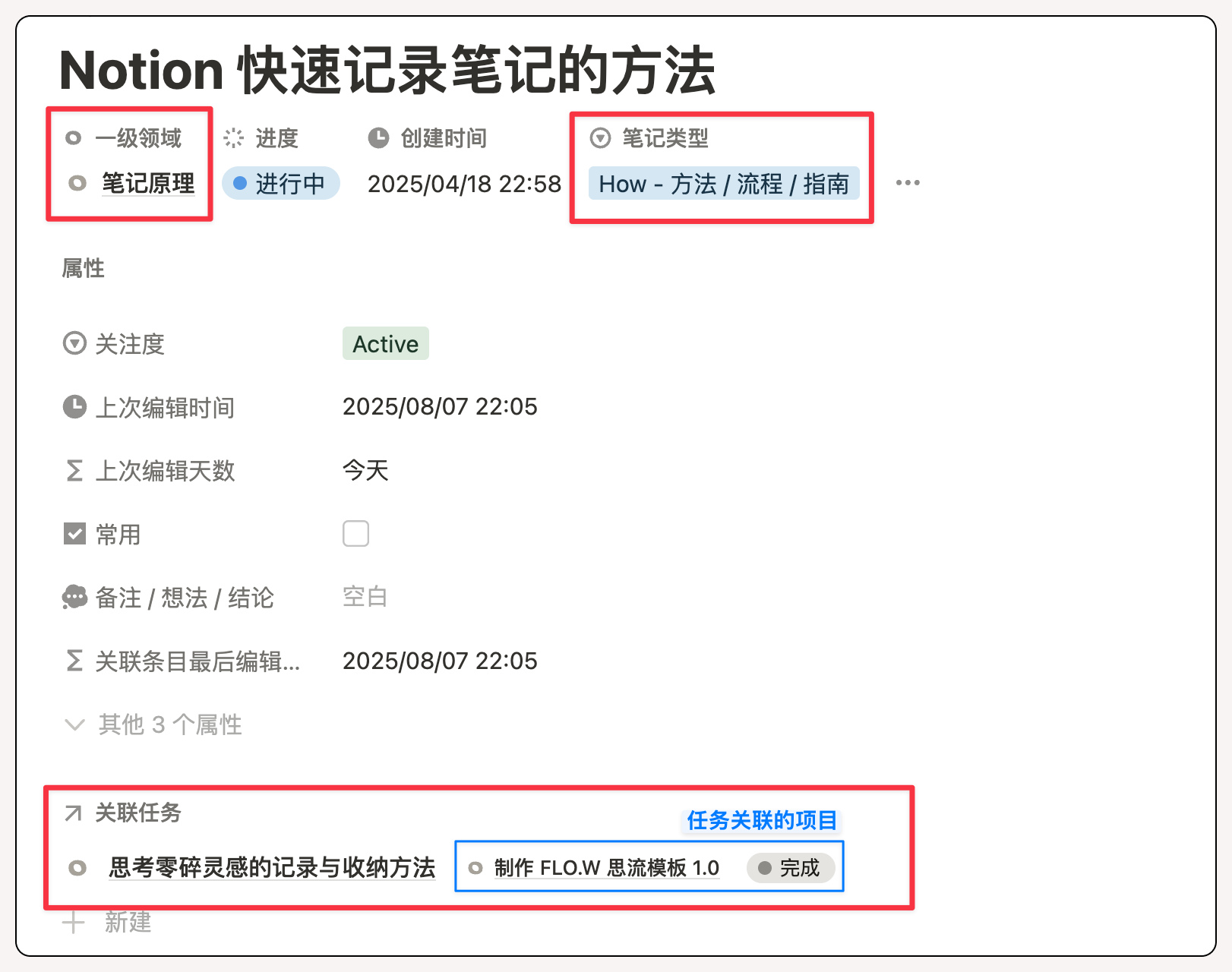
This way we achieve "organize information around action" purpose, because action always happens in specific scenarios. This contextual memory is often more profound. With fuzzy scenario clues, can quickly locate this Note through "Project association" or "Area classification," without aimlessly searching among hundreds of Notes.
About Notion Template
Many times my brain is like a crowded railway station - too many ideas and tasks like trains without schedules,随时涌入又离去. Notion is the solution I've found so far. It builds me a clear schedule - giving each idea and task clear tracks, stations, and arrival times, no longer chaotically colliding for right of way, but running orderly as planned.
It's not the only choice, nor suitable for everyone. This system can't give me superpowers, only lets me entrust those heavy memory, organization, and scheduling work to external systems. It finally lets me leave attention for truly important things: deeply thinking about a problem, creating valuable works, or enjoying a trip with family without repeatedly confirming itinerary. Those inner orders ultimately reward with outer peace and freedom.
Over these years, I've seen too many readers enthusiastically try Notion, only to get lost in complex database associations and formulas. Also seen many excitedly download templates, but because difficulty is truly too high, lose patience before understanding how to use. If you're at this stage, you might want to check out my 5 tips for Notion beginners - it might help you find the right way to get started.
So I think reasonable onboarding path should be from simple to complex. Blindly displaying Notion's complexity is undesirable, creating demand is putting the cart before the horse. Truly effective templates should both solve actual pain points and be easy to understand and operate. Therefore, since writing the first article of the Notion course column two years ago, I've been thinking how to find a better, faster solution. FLO.W Template is the answer I present now.
It's the collection of all my trial and error, all thinking, all "should have done this way" realizations.
Unlike some complex Notion templates, the FLO.W system doesn't preset your goals in the template, doesn't deliberately plan your route, much less make life decisions for you. Because everyone's needs and ideas vary greatly. Those seemingly useful life goal modules often only leave psychological burden of giving up halfway after stirring three-minute ripples.
My goal is simple: provide a reliable action framework, like a high-performance tram - though with strong engine and flexible wheels, how the steering wheel turns, where it drives, is always decided by you. This way you can truly master your work and life rhythm, not be bound by templates.
If the Notion course column (link) is me as an "architect" sharing architectural principles, structural design thinking, and specific construction methods with you, then "FLO.W" Template is the fully furnished room I built for you based on these thinking, ready to move in. I've already handled all the most complex, tedious underlying engineering for you, completing those database associations and formula writing that would consume 90% of beginners' enthusiasm.
It has:
-
Solid foundation: carefully designed databases
-
Reasonable circulation: three-layer information filtering system
-
Complete utilities: preset associations, formulas, filters, and buttons
You can move in directly - its basic functions are powerful enough to solve 80% of your daily problems, freeing you from chaos. You can treat it as a decomposable Lego model, learn and understand its construction and interaction principles, thereby truly mastering Notion's architectural principles. More importantly, you can add your unique soft decoration on this template foundation - add, delete modules, design personalized workflows, until it becomes your exclusive productivity engine.
The Template comes standard with complete graphic and video manual - every detail usage broken down for you, no tinkering needed, works out of the box.
Hope "FLO.W" saves you hundreds of hours of exploration time, lets you enjoy Notion's convenience and fun from the start, and in this chaotic, uncertain world, win yourself some inner order, peace, and freedom.
🎯 Seven Years of Refinement, One-Click Launch
All insights and thinking shared in this article have been condensed into the FLO.W Template. It's not feature stacking, but a progressive information management solution based on a three-layer filtering system, helping you build a truly sustainable personal operating system.