# 故障排除 (https://21notion.com/docs/faq/troubleshooting)
import { Accordion, Accordions } from 'fumadocs-ui/components/accordion';
import { Steps, Step } from 'fumadocs-ui/components/steps';
import { Card, Cards } from 'fumadocs-ui/components/card';
遇到问题?本页面收录了 FLO.W 模板的常见故障及解决方案。
## 误删内容恢复
不小心删错了东西?别慌,按照下面的方法可以找回来。
最简单的方法:立即按快捷键撤销。
* **Windows**:`Ctrl + Z`
* **Mac**:`Cmd + Z`
可以连续按多次,逐步撤回之前的操作。
**注意**:关闭页面或刷新后,撤销记录会清空,这个方法就失效了。
如果你不小心删掉了页面上的某个模块(比如一个数据库视图),但页面本身还在——别担心,你删掉的只是页面上的「展示窗口」,数据库本身和里面的数据都还在。
**方法一:通过页面历史恢复**
1. 点击页面右上角的 `···` 菜单
2. 选择「版本历史」
3. 在右侧时间线中找到删除之前的版本
4. 点击「恢复」
**方法二:从数据库页面重新嵌入**
如果页面历史无法恢复,可以手动把数据库重新放回来。FLO.W 的所有原始数据库都集中存放在导航栏的「数据库」页面中,只需要找到它、复制链接、粘贴回来即可:
1. 打开 FLO.W 顶部导航栏,进入「数据库」页面
2. 找到你需要的数据库(如「打卡动态」)
3. 进入该数据库,使用 `Ctrl+L`(Mac:`Cmd+L`)复制链接
4. 回到原来的页面,粘贴链接,创建镜像视图
5. 根据需要调整数据库设置(布局、属性可见性等)
Notion 删除的页面会进入「回收站」,30 天内可以找回:
1. 点击左侧边栏底部的「回收站」
2. 搜索被删除的页面名称
3. 找到后点击「恢复」
**注意**:回收站内容有保留期限,请尽早恢复。
## 模板激活问题
如果您在数据库中创建笔记时遇到模板无法激活的问题:
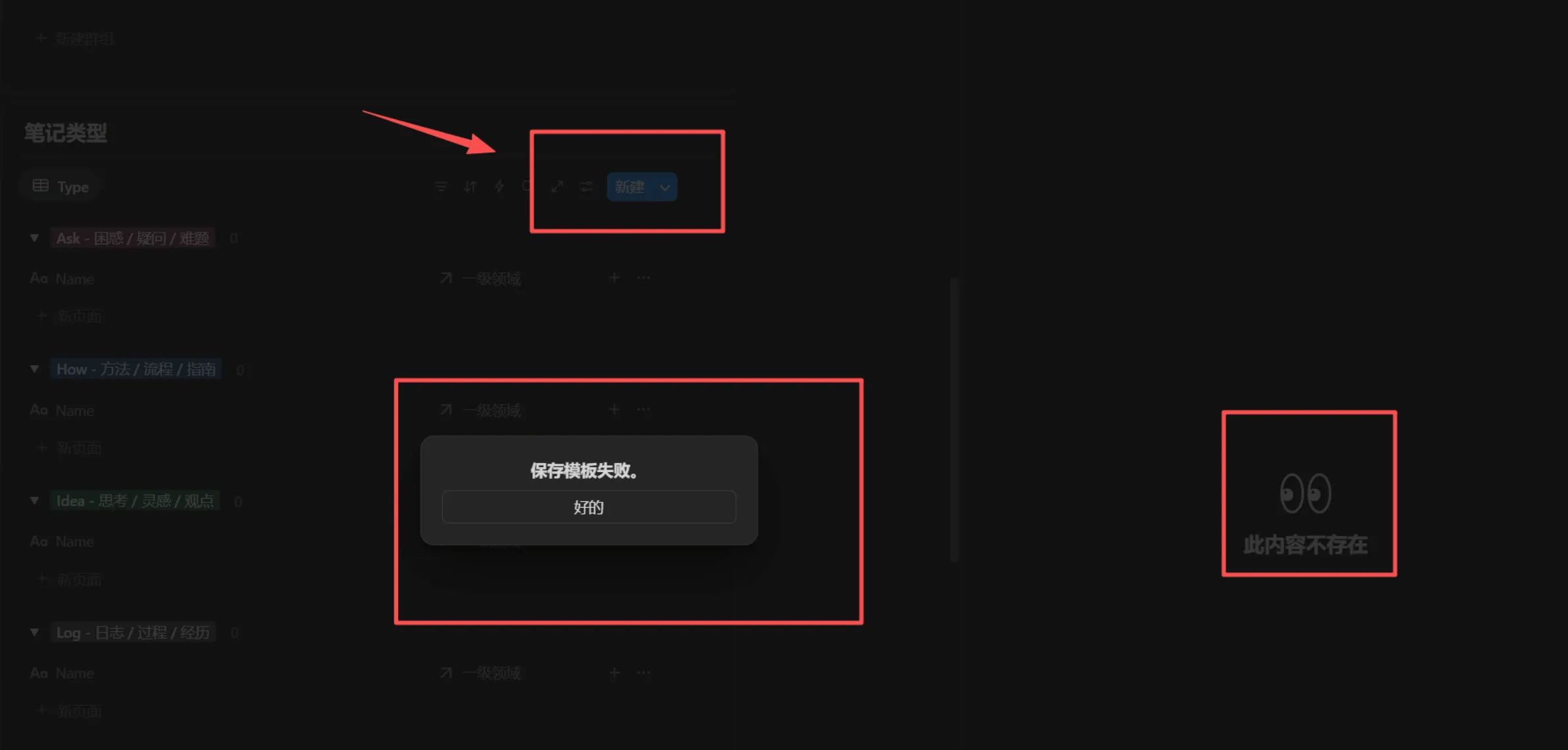
**解决步骤**
1. 点击数据库的视图标题
2. 打开【源数据库】
3. 使用 `Ctrl+L`(Windows)或 `Cmd+L`(Mac)复制【源数据库】的链接
4. 将复制的链接粘贴到出问题的数据库页面中
5. 创建一个新的镜像视图
6. 测试新镜像视图的【模板】是否能正常激活
**如果问题仍然存在**
* 请在飞书群新开一个话题提问
* 提供具体的错误截图和操作步骤
* 我们会协助您快速解决问题
**预防措施**
* 避免随意删除或移动源数据库
* 保持模板结构的完整性
在实际操作过程中,当你创建一个新的页面,却发现页面的样子与我视频中展现的样子不一样,原因可能是你没有成功激活模板。这个时候你可以点击页面下方的这个模板按钮,稍等片刻就可以重新激活模板了。
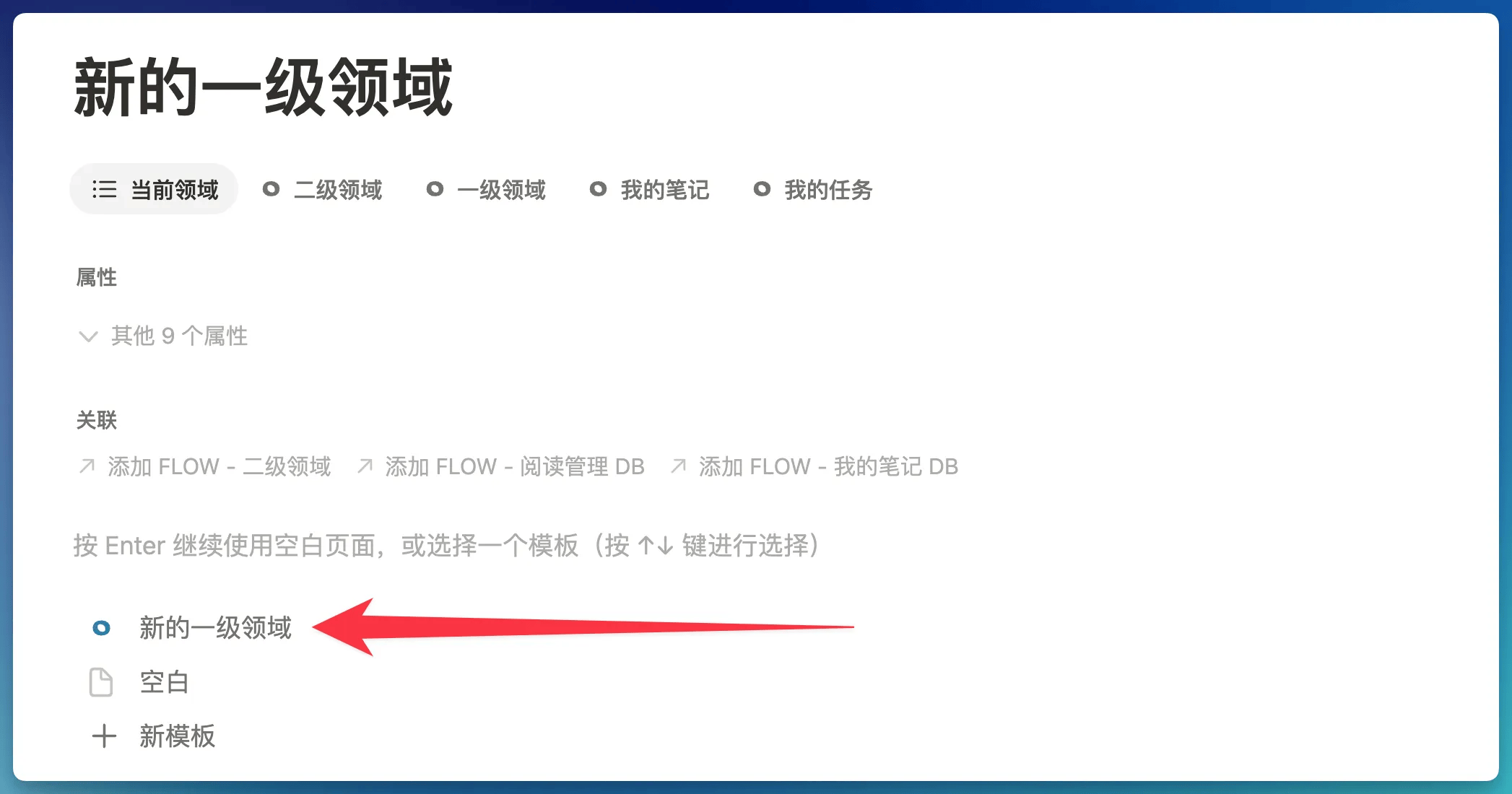
但有时候你可能会发现页面中并没有类似的模板按钮,原因在于,这个页面已经不是「空白页面」了,只有「**没有任何内容的空白页面**」才会出现模板按钮。
在这种情况下,你可以点击页面,全选所有内容(包括空白的段落),然后执行删除操作,就可以将页面还原为「空白页面」,然后模板按钮就会出现了。
## 已知错误修复
由于 FLO.W 系统的体量过于庞大,因此有可能在各种细节角落存在一些错误,本章节即为修复这些错误而建。
> **适用范围**:2025 年 11 月 3 日之前复制模板的用户。之后复制的模板已修复此问题。
**问题表现**
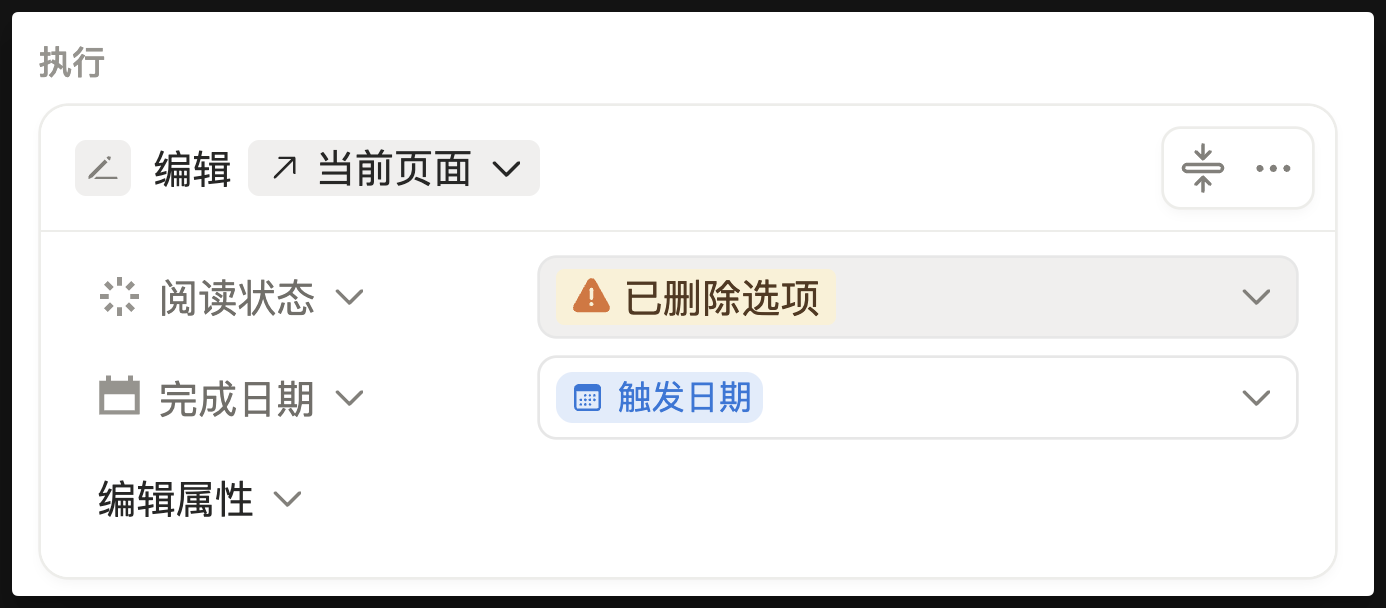
在剪藏文章中,点击【完成】按钮,无法将阅读状态改为【已完成】
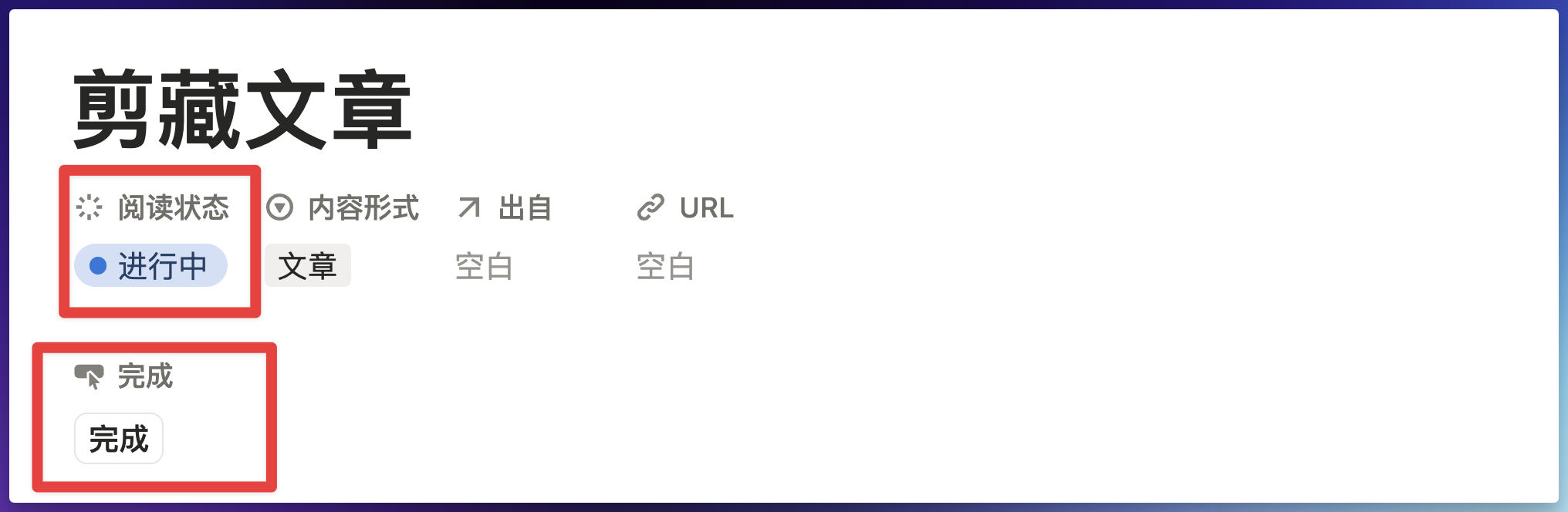
**解决方法**
点击【完成】这个字段,会弹出如下提示
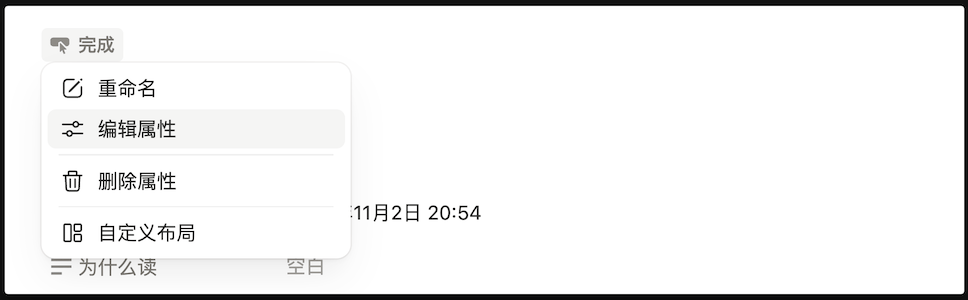
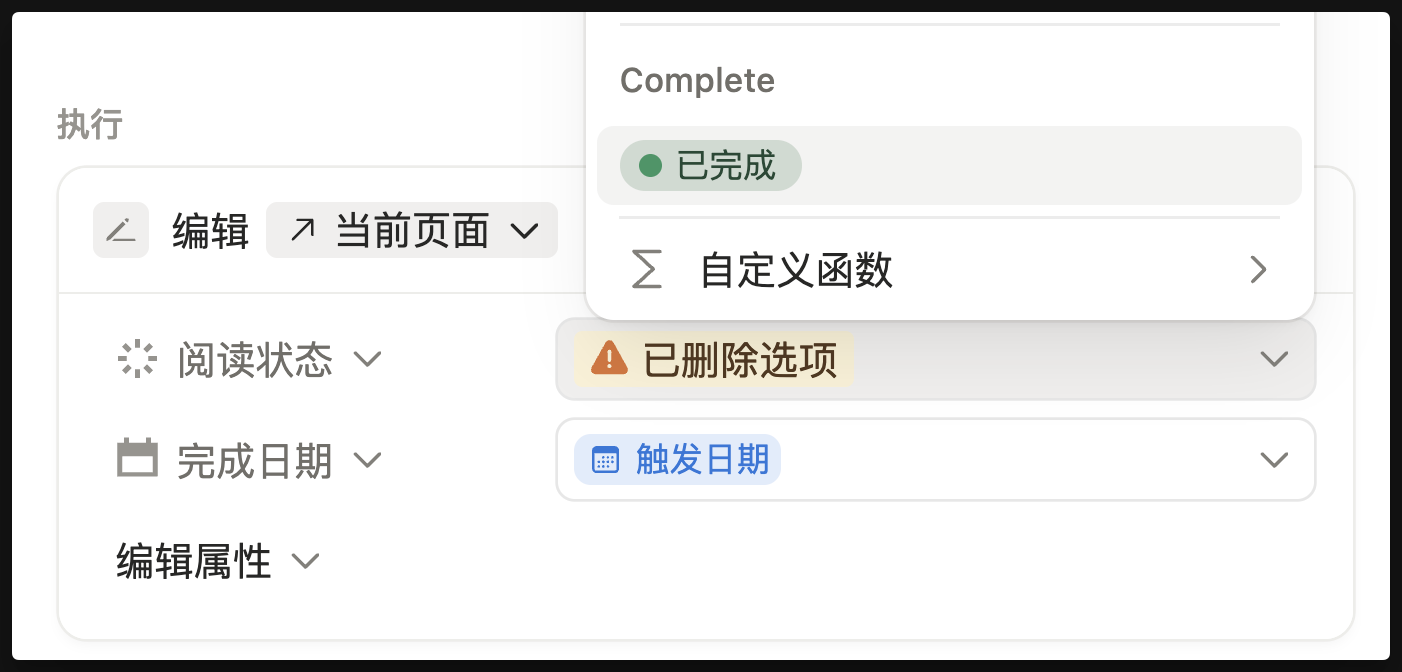
然后再点击【编辑属性 - 编辑自动化】,然后点击出现错误的地方
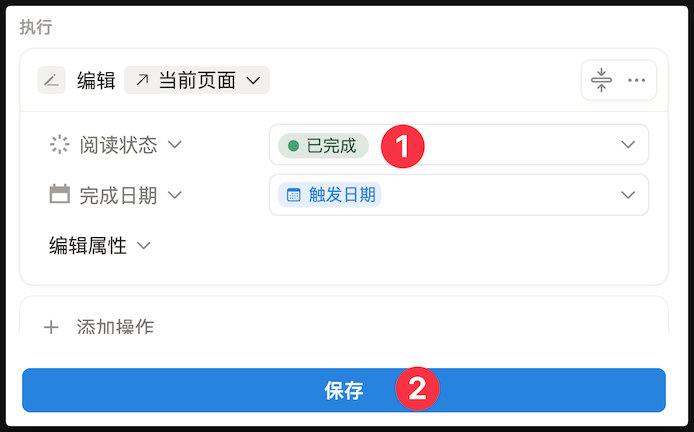
把【已删除选项】改成【已完成】
最后点击保存按钮即可
> **适用范围**:2025 年 11 月 3 日之前复制模板的用户。之后复制的模板已修复此问题。
**问题表现**
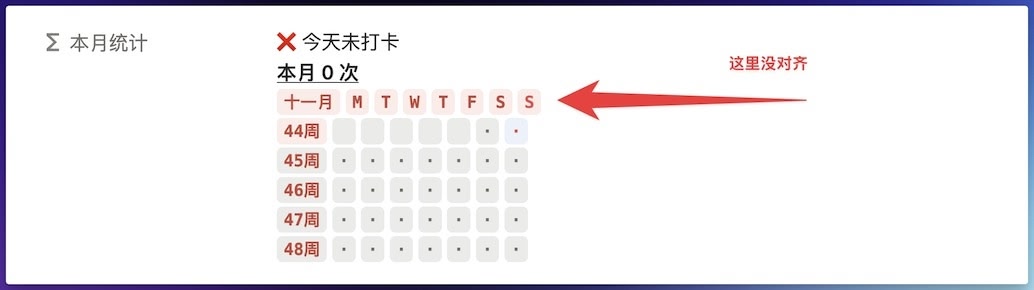
当月份来到 11 月或者 12 月的时候,热力图的显示就会无法正确对齐,如下图所示:
**解决方法**
复制下面这段代码,然后覆盖原有的代码即可
```
/* ========== 打卡统计看板 (基于当前月份) - 集成习惯分类和月度目标 ========== */
lets(
/* --- 核心变量 --- */
boardReferenceDate, now(), /* 看板始终基于当前日期和时间 */
currentYear, boardReferenceDate.formatDate("YYYY"), /* 当前年份字符串 */
currentMonth, boardReferenceDate.formatDate("MM"), /* 当前月份字符串 */
boardYearMonth, currentYear + "/" + currentMonth, /* 当前年月,例如 "2025/05" */
/* --- 今日打卡状态 --- */
todayDateText, now().formatDate("YYYY/MM/DD"),
allRecords, prop("打卡记录"), /* 所有打卡记录 */
isCheckedInToday, allRecords.filter(current.prop("日期").formatDate("YYYY/MM/DD") == todayDateText).length() > 0,
todayCheckInStatusText, if(isCheckedInToday, "✅ 今天已打卡", "❌ 今天未打卡"),
habitCategory, prop("习惯分类"), /* 获取习惯分类 */
monthlyLimitTarget, prop("目标/上限"), /* 获取每月上限或下限目标值 */
/* 根据习惯分类调整标记和颜色 */
triggerMark, if(habitCategory == "好习惯", "✓", "x"),
userDefinedColorForHabit, prop("习惯颜色"),
triggerColor, if(
habitCategory == "好习惯",
"green",
empty(userDefinedColorForHabit) ? "red" : userDefinedColorForHabit
),
/* --- 1. 计算当月触发/完成次数 --- */
/* allRecords 已在上方定义 */
monthlyTriggers,
allRecords.filter(
current.prop("日期").formatDate("YYYY/MM") == boardYearMonth
).length(),
/* --- 2. 构建第一行显示的习惯信息字符串 (对好坏习惯均显示) --- */
habitInfo,
lets(
baseText, format("本月 ") + monthlyTriggers + " 次",
actualSuffixText, /* 初始化后缀文本 */
if(empty(monthlyLimitTarget),
"", /* 如果没有设置目标/上限,则后缀为空 */
if(habitCategory == "好习惯",
lets(
neededForTarget, monthlyLimitTarget - monthlyTriggers,
if(neededForTarget <= 0,
"|已达标",
"|还需 " + format(neededForTarget) + " 次"
)
),
/* 当为坏习惯时 */
lets(
remainingCount, monthlyLimitTarget - monthlyTriggers,
if(remainingCount >= 0,
"|剩余 " + format(remainingCount) + " 次",
"|已超额 " + format(abs(remainingCount)) + " 次"
)
)
)
),
(baseText + actualSuffixText).style("b", "u") /* 组合并应用样式 */
),
/* --- 3. 月份和星期表头 --- */
monthHeader,
lets(
monthNum, boardReferenceDate.formatDate("MM").toNumber(),
monthText, if(monthNum >= 11,
boardReferenceDate.formatDate("MMM"), /* 11、12月用缩写 */
boardReferenceDate.formatDate("MM") + "月" /* 1-10月用数字 */
),
monthText.style(
triggerColor + "_background", "c", "b", triggerColor
)
),
dayAbbreviations, ["M", "T", "W", "T", "F", "S", "S"],
weekHeader, dayAbbreviations.map(
lets(
dayAbbr, current,
dayIndex, index,
systemToday, now().day(),
isToday, (systemToday == 0 && dayIndex == 6) || (systemToday != 0 && systemToday - 1 == dayIndex),
dayAbbr.style(
triggerColor + "_background", "c", "b",
isToday ? ((triggerColor == "yellow" || triggerColor == "pink" || triggerColor == "green" || triggerColor == "gray") ? "brown" : "white") : triggerColor
)
)
).join(" "),
fullHeader, monthHeader + " " + weekHeader,
/* --- 4. 每周打卡热图 --- */
firstDayOfBoardMonth, parseDate(currentYear + "-" + currentMonth),
startDayOfWeekForBoardMonth, firstDayOfBoardMonth.day(),
week1StartDate, firstDayOfBoardMonth.dateSubtract((startDayOfWeekForBoardMonth + 6) % 7, "days"),
weekDaysOffsets, [0, 1, 2, 3, 4, 5, 6],
weekOffsetsForMap, [0, 7, 14, 21, 28, 35],
allWeekViewsRendered, weekOffsetsForMap.map(
lets(
daysToAdd, current,
currentWeekStartDate, week1StartDate.dateAdd(daysToAdd, "days"),
currentWeekIndex, index,
isThisWeekPotentiallyRelevant, currentWeekStartDate.formatDate("YYYY/MM") == boardYearMonth || currentWeekStartDate.dateAdd(6, "days").formatDate("YYYY/MM") == boardYearMonth,
displayThisWeek, (currentWeekIndex < 5) || (currentWeekIndex == 5 && isThisWeekPotentiallyRelevant),
weekViewContent, displayThisWeek ? (
(currentWeekStartDate.formatDate("WW") + "周").style(
currentWeekStartDate.formatDate("YYYY/WW") == now().formatDate("YYYY/WW") ? triggerColor + "_background" : "",
"c", "b", triggerColor
) + " " +
weekDaysOffsets.map(
lets(
dayOffset, current,
currentDayInGrid, currentWeekStartDate.dateAdd(dayOffset, "days"),
isCurrentDisplayMonth, currentDayInGrid.formatDate("YYYY/MM") == boardYearMonth,
dailyTriggersCount, isCurrentDisplayMonth ?
allRecords.filter(
current.prop("日期").formatDate("YYYY/MM/DD") == currentDayInGrid.formatDate("YYYY/MM/DD")
).length() : 0,
isActualToday, currentDayInGrid.formatDate("YYYY/MM/DD") == todayDateText, /* 使用 todayDateText 比较 */
(dailyTriggersCount > 0 ? triggerMark : (isCurrentDisplayMonth ? "·" : " ")).style(
dailyTriggersCount > 0 ? triggerColor + "_background" : (isActualToday && isCurrentDisplayMonth ? "blue_background" : ""),
"c", "b",
dailyTriggersCount > 0 ? triggerColor : (isCurrentDisplayMonth ? (isActualToday ? "white" : "gray") : "")
)
)
).join(" ")
) : "",
weekViewContent
)
).filter(current != "").join("\n"),
/* --- 构建本月目标/上限的文本行 (for summary) --- */
monthlyTargetDisplayLine,
if(empty(monthlyLimitTarget),
"", /* 如果目标/上限为空,则此行为空 */
if(habitCategory == "好习惯",
format("本月目标 ") + format(monthlyLimitTarget) + " 次",
format("本月上限 ") + format(monthlyLimitTarget) + " 次"
)
),
/* --- 计算上个月和年度统计 (for summary) --- */
dateForLastMonth, boardReferenceDate.dateSubtract(1, "months"),
lastMonthYearMonth, dateForLastMonth.formatDate("YYYY/MM"),
lastMonthTriggers, allRecords.filter(
current.prop("日期").formatDate("YYYY/MM") == lastMonthYearMonth
).length(),
percentageChangeText, /* 调整 "从0增加" 的措辞 */
if(lastMonthTriggers == 0,
/* 当上个月为0次时 */
if(monthlyTriggers > 0,
"本月增加 " + format(monthlyTriggers) + " 次", /* 修正:去掉重复的 "上个月 0" */
"无变化" /* 如果本月也为0次,则为无变化 */
),
/* 当上个月不为0次时,计算百分比 */
lets(
diff, monthlyTriggers - lastMonthTriggers,
percentage, round(diff / lastMonthTriggers * 100),
if(percentage == 0,
"无变化",
if(percentage > 0,
"增加 " + format(percentage) + "%",
"下降 " + format(abs(percentage)) + "%"
)
)
)
),
lastMonthSummary, "上个月 " + format(lastMonthTriggers) + " 次|" + percentageChangeText,
thisYearTriggers, allRecords.filter(
current.prop("日期").formatDate("YYYY") == currentYear
).length(),
thisYearSummary, "今年总计 " + format(thisYearTriggers) + " 次",
/* --- 5. 最终拼接所有部分 --- */
finalOutput,
todayCheckInStatusText + "\n" +
habitInfo + "\n" +
fullHeader + "\n" +
allWeekViewsRendered + "\n\n" +
if(empty(monthlyTargetDisplayLine), "", monthlyTargetDisplayLine + "\n") +
lastMonthSummary + "\n" +
thisYearSummary + "\n",
finalOutput
)
```
> **适用范围**:2025 年 11 月 2 日之前复制模板的用户。之后复制的模板已修复此问题。
**问题表现**
打开剪藏模块中的文章,找到【关联字段最后编辑时间】这个字段,点击之后发现如下图所示的错误:
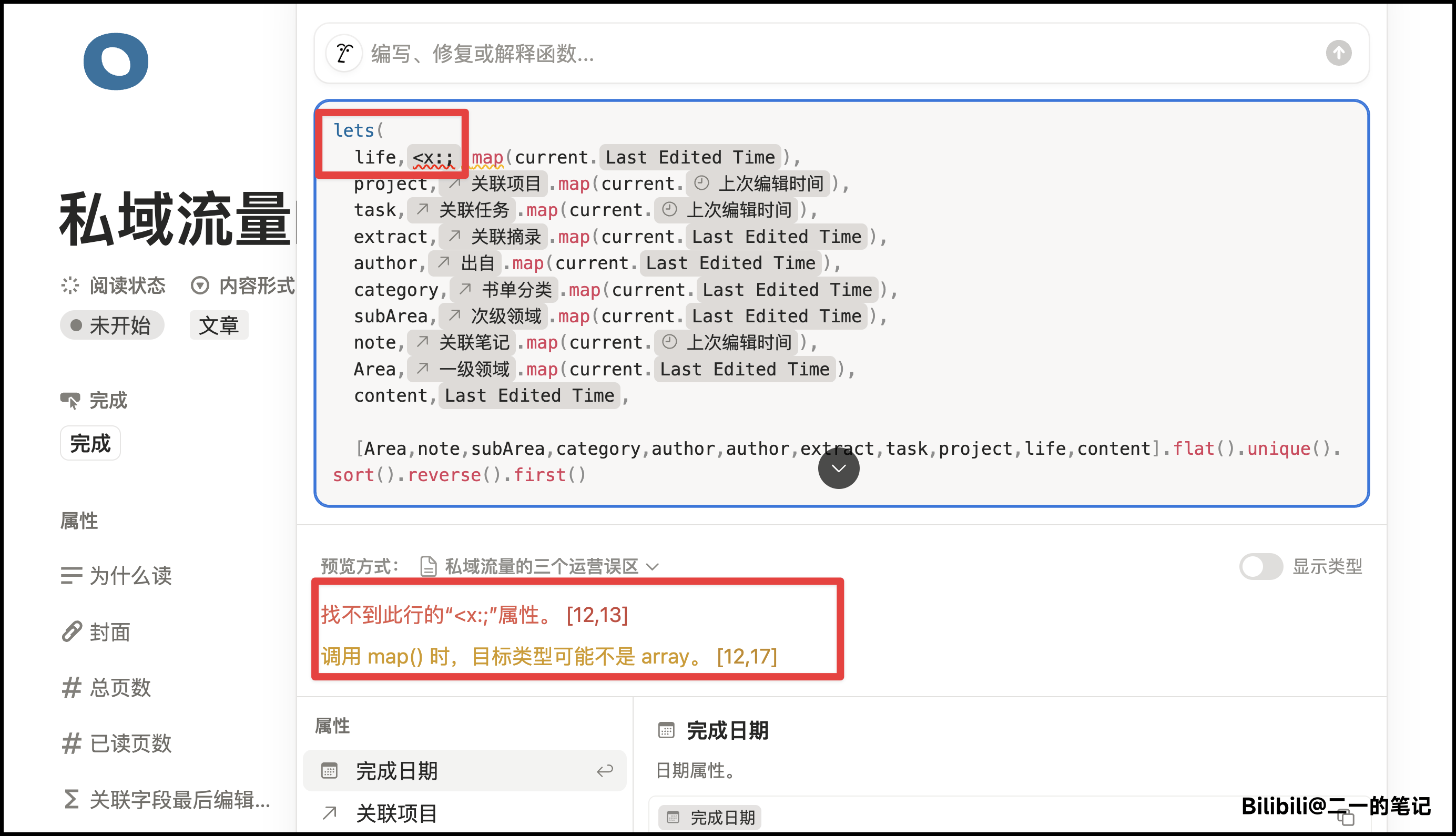
**解决方法**
复制以下代码,然后完整覆盖即可
```
lets(
project,prop("关联项目").map(current.prop("上次编辑时间")),
task,prop("关联任务").map(current.prop("上次编辑时间")),
extract,prop("关联摘录").map(current.prop("Last Edited Time")),
author,prop("出自").map(current.prop("Last Edited Time")),
category,prop("书单分类").map(current.prop("Last Edited Time")),
subArea,prop("次级领域").map(current.prop("Last Edited Time")),
note,prop("关联笔记").map(current.prop("上次编辑时间")),
Area,prop("一级领域").map(current.prop("Last Edited Time")),
content,prop("Last Edited Time"),
[Area,note,subArea,category,author,author,extract,task,project,content].flat().unique().sort().reverse().first()
)
```
这次改动不影响任何功能,只是删去了一段无用的代码。
> **适用范围**:2025 年 9 月 14 日之前复制模板的用户。之后复制的模板已修复此问题。
**问题表现**
在某些情况下,如果你打开数据库,点击顶部的【主页】按钮
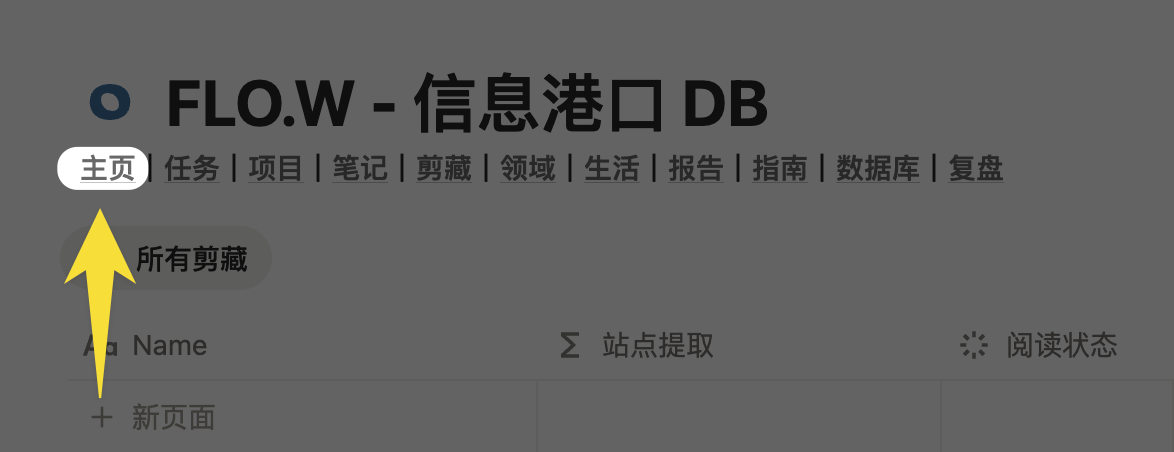 却跳转到了网页的某个地方
 **解决方法**
**方法 1:修复链接**
进入你的模板主页,然后使用快捷键 Ctrl+L(Mac 用户请使用 Cmd+L),复制主页链接
**解决方法**
**方法 1:修复链接**
进入你的模板主页,然后使用快捷键 Ctrl+L(Mac 用户请使用 Cmd+L),复制主页链接
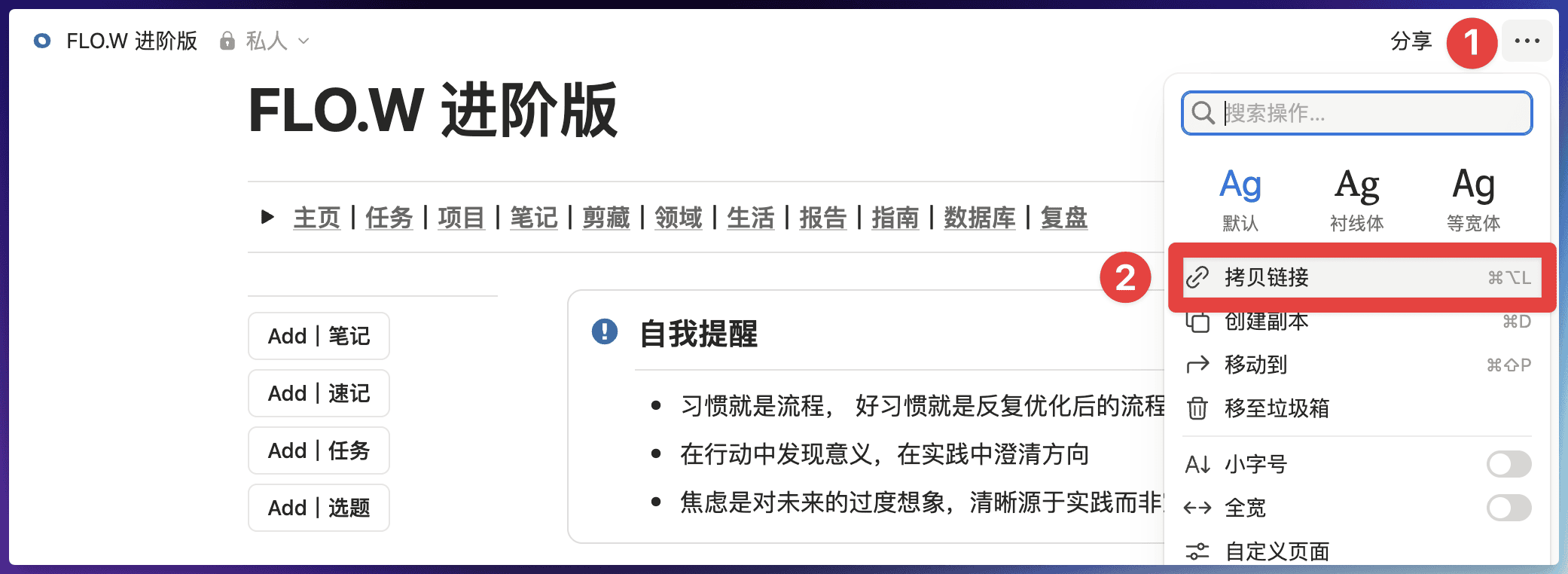 回到你出现问题的数据库页面,然后编辑【主页】按钮的超链接
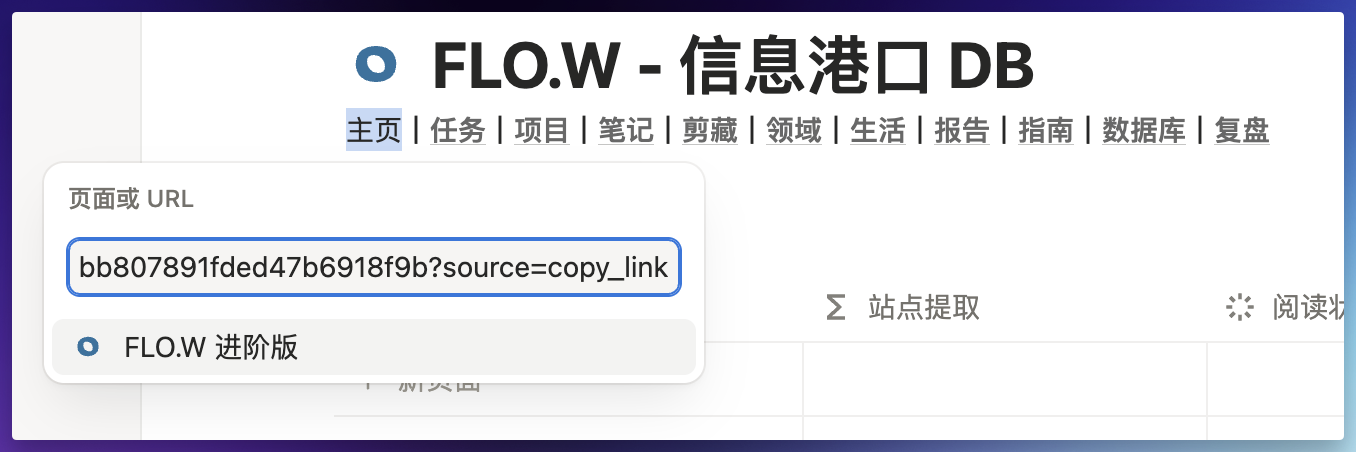
1. 鼠标悬停在【主页】两个字上
2. 点击【编辑】按钮,这个时候会弹出一个框
回到你出现问题的数据库页面,然后编辑【主页】按钮的超链接
1. 鼠标悬停在【主页】两个字上
2. 点击【编辑】按钮,这个时候会弹出一个框
 在【页面或 URL】的输入框内,粘贴步骤 1 获得的链接,粘贴之后回车,然后再点击【主页】按钮,就可以跳转到正确的主页了。
 **方法 2:删除导航**
鉴于这个位置的导航使用频率比较低,因此你也可以直接把整串导航删掉,一般情况下不会影响使用。
> **适用范围**:2025 年 9 月 14 日之前复制模板的用户。之后复制的模板已修复此问题。
**问题表现**
在【生活 - 愿望】模块中,存在一个【加入已购买】的按钮
**方法 2:删除导航**
鉴于这个位置的导航使用频率比较低,因此你也可以直接把整串导航删掉,一般情况下不会影响使用。
> **适用范围**:2025 年 9 月 14 日之前复制模板的用户。之后复制的模板已修复此问题。
**问题表现**
在【生活 - 愿望】模块中,存在一个【加入已购买】的按钮
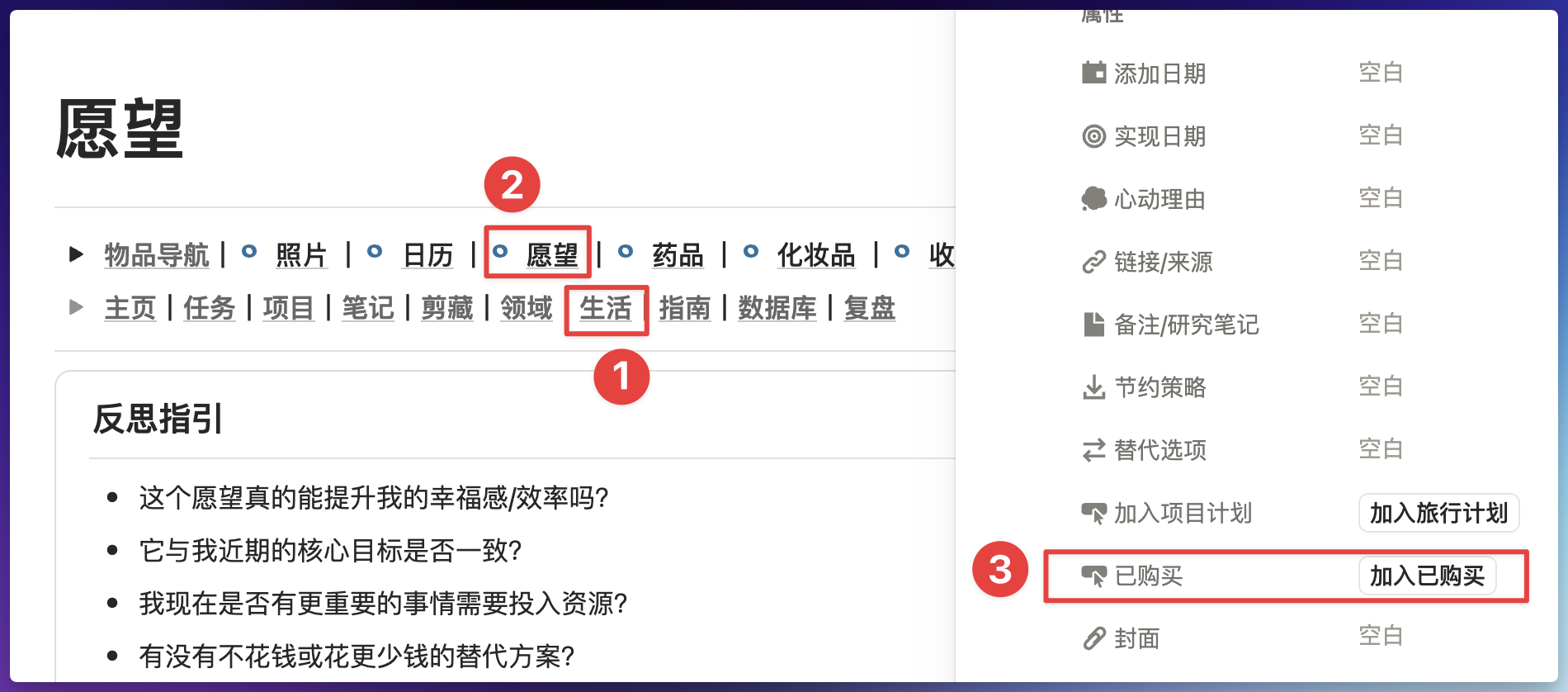 如果你点击这个按钮出现错误,可能是个这个按钮中的某个步骤出现了错误
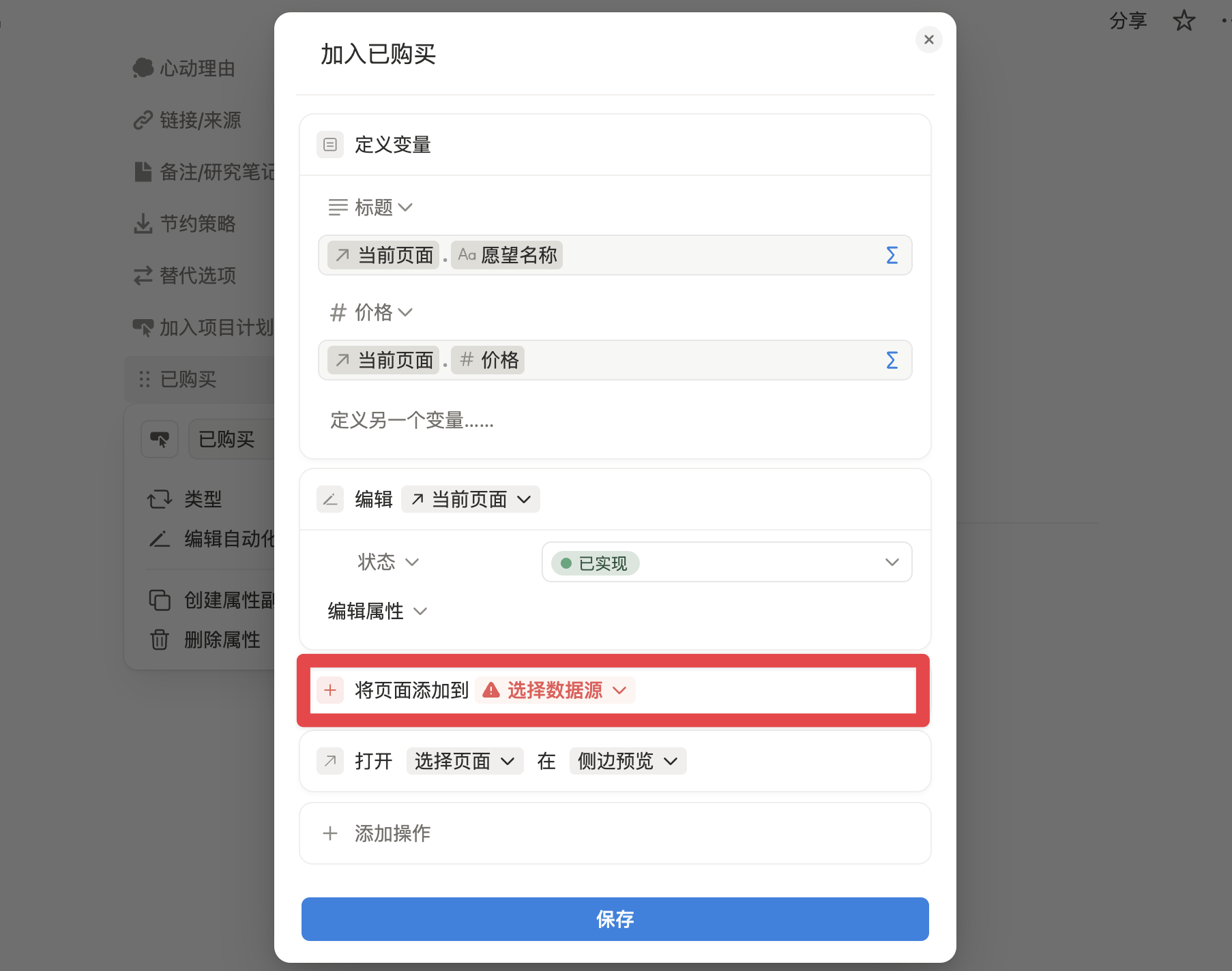 **解决办法**
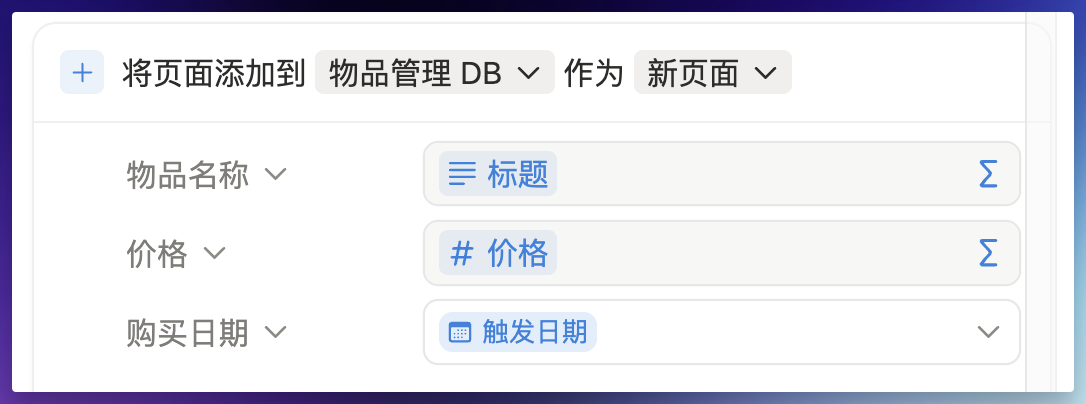
按照下图所示方法,重新编辑一下这个按钮即可
**解决办法**
按照下图所示方法,重新编辑一下这个按钮即可
 ***
## Notion 打不开?
如果 Notion 网站或客户端突然无法访问,可能是 Notion 官方服务出了问题,不是你的网络或模板的原因。
* 访问 [Notion 官方状态页面](https://www.notion-status.com/) 查看当前服务是否正常
* 如果不是官方故障,可以参考 [Notion 访问加速方案](/docs/notion-download#notion-access-speed)
***
**问题没解决?** 加入 [飞书交流群](/docs/faq/support#join-feishu-group) 获取人工支持。
***
## Notion 打不开?
如果 Notion 网站或客户端突然无法访问,可能是 Notion 官方服务出了问题,不是你的网络或模板的原因。
* 访问 [Notion 官方状态页面](https://www.notion-status.com/) 查看当前服务是否正常
* 如果不是官方故障,可以参考 [Notion 访问加速方案](/docs/notion-download#notion-access-speed)
***
**问题没解决?** 加入 [飞书交流群](/docs/faq/support#join-feishu-group) 获取人工支持。