# Troubleshooting (https://21notion.com/en/docs/faq/troubleshooting)
import { Accordion, Accordions } from 'fumadocs-ui/components/accordion';
import { Steps, Step } from 'fumadocs-ui/components/steps';
import { Card, Cards } from 'fumadocs-ui/components/card';
Having issues? This page documents common FLO.W template problems and their solutions.
## Recovering Deleted Content
Accidentally deleted something? Don't panic — follow these methods to get it back.
The simplest fix: immediately press the undo shortcut.
* **Windows**: `Ctrl + Z`
* **Mac**: `Cmd + Z`
You can press it multiple times to step back through recent actions.
**Note**: Undo history is cleared after closing or refreshing the page, so this only works right away.
If you accidentally deleted a module on a page (like a database view), but the page itself is still there — don't worry. You only removed the "display window"; the database and all its data are still intact.
**Method 1: Restore via Page History**
1. Click the `···` menu at the top-right of the page
2. Select **Page History**
3. Find the version from before the deletion in the left timeline
4. Click **Restore**
**Method 2: Re-embed from the Database Page**
If Page History doesn't work, you can manually add the database back. All original databases in FLO.W are centrally stored in the "Database" page accessible from the top navigation bar — just find it, copy the link, and paste it back:
1. Open the FLO.W top navigation bar and go to the **Database** page
2. Find the database you need (e.g., "Check-in Dynamics")
3. Open it, then press `Ctrl+L` (Mac: `Cmd+L`) to copy the link
4. Go back to the original page, paste the link to create a linked view
5. Adjust database settings as needed (layout, property visibility, etc.)
Deleted pages in Notion go to the **Trash** and can be recovered within 30 days:
1. Click **Trash** at the bottom of the left sidebar
2. Search for the deleted page by name
3. Click **Restore**
**Note**: Trash content has a retention period — restore it as soon as possible.
## Template Activation Issues
If you encounter issues where templates won't activate when creating notes in a database:
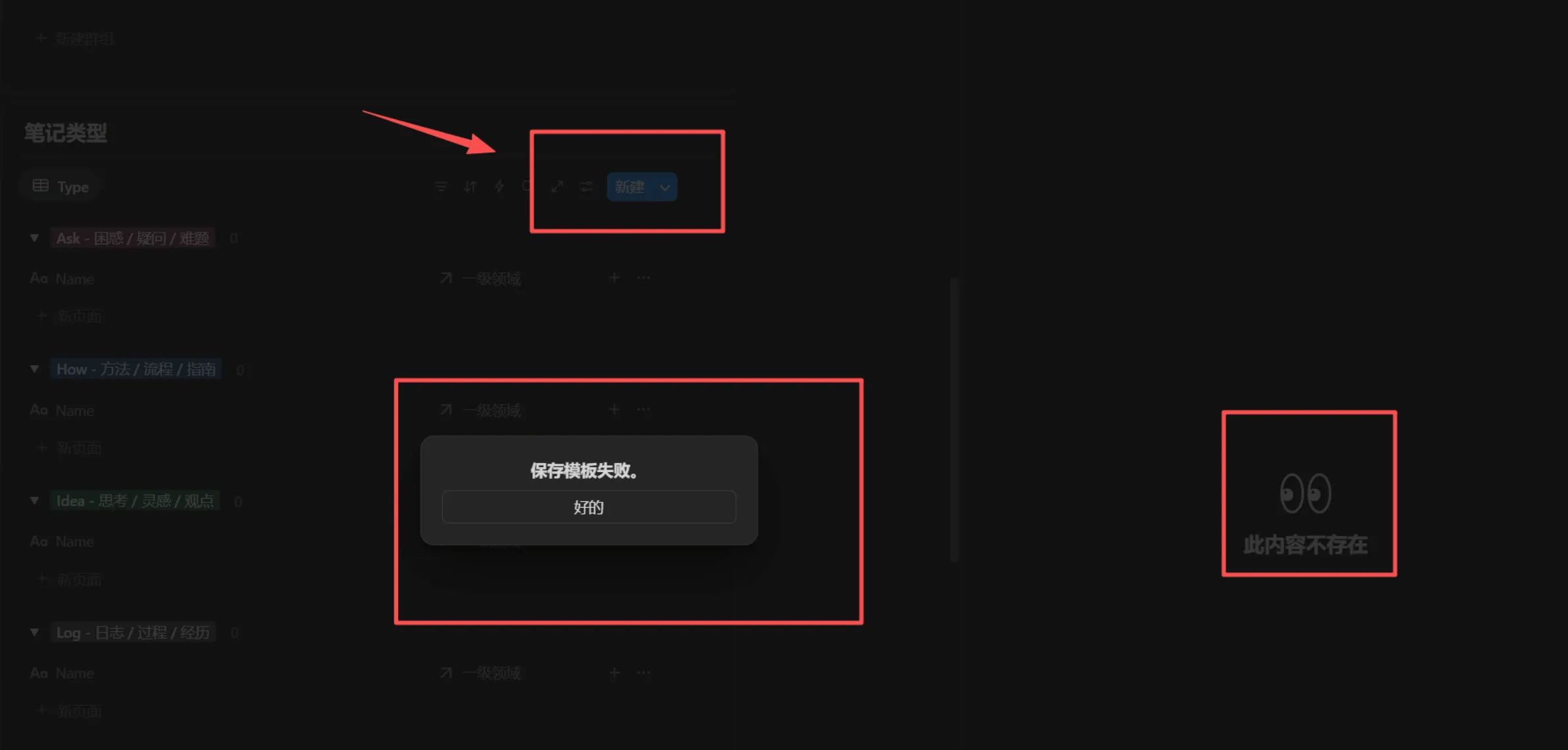
**Solution Steps**
1. Click on the database view title
2. Open the Source Database
3. Use `Ctrl+L` (Windows) or `Cmd+L` (Mac) to copy the Source Database link
4. Paste the copied link into the problematic database page
5. Create a new linked view
6. Test if the new linked view's template activates properly
**If the Issue Persists**
* Start a new topic in the Lark group
* Provide specific error screenshots and operation steps
* We'll help you resolve the issue quickly
**Prevention Tips**
* Avoid randomly deleting or moving source databases
* Maintain template structure integrity
During actual operation, when you create a new page but find it looks different from what I showed in the video, the reason might be that you didn't successfully activate the template. In this case, you can click the template button at the bottom of the page, wait a moment, and the template will be reactivated.
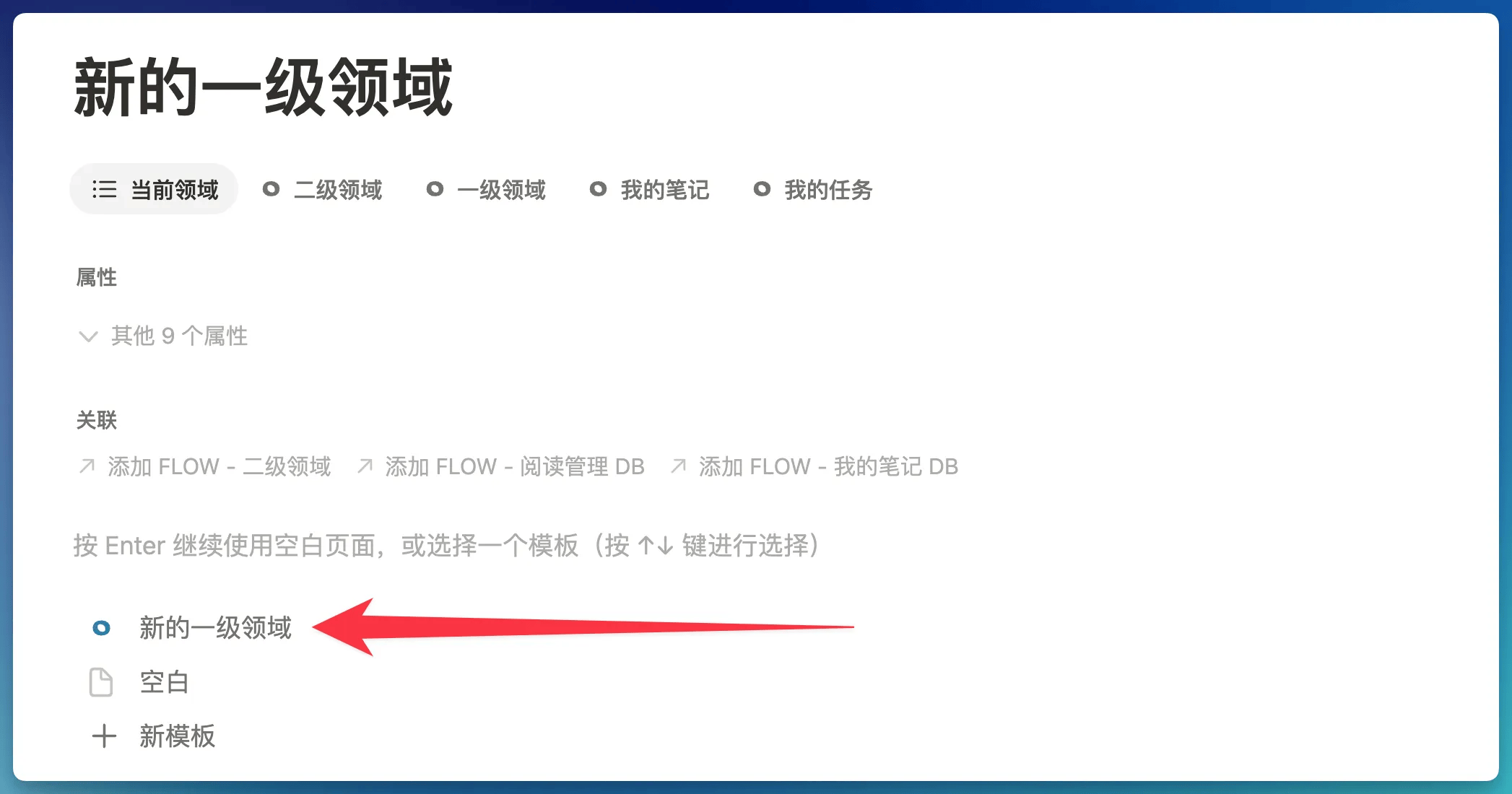
But sometimes you might find there's no template button on the page. This is because the page is no longer a "blank page" - only a "**completely empty blank page**" will show the template button.
In this situation, you can click on the page, select all content (including empty paragraphs), then delete them to restore the page to a "blank page", and the template button will appear.
## Known Bug Fixes
Due to the massive scale of the FLO.W system, there may be some errors in various corners. This section is dedicated to fixing these errors.
> **Applies to**: Users who copied the template before November 3, 2025. Templates copied after this date have this issue fixed.
**Issue Description**
In clipped articles, clicking the "Complete" button doesn't change the reading status to "Completed"
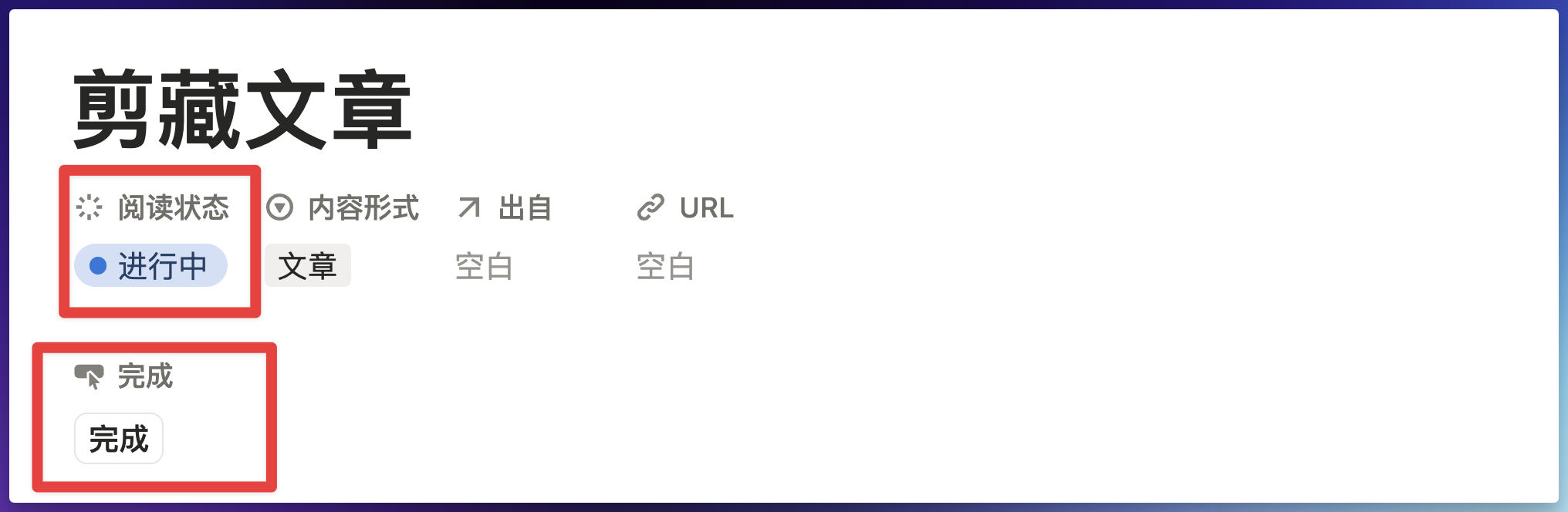
**Solution**
Click the "Complete" property, and the following prompt will appear
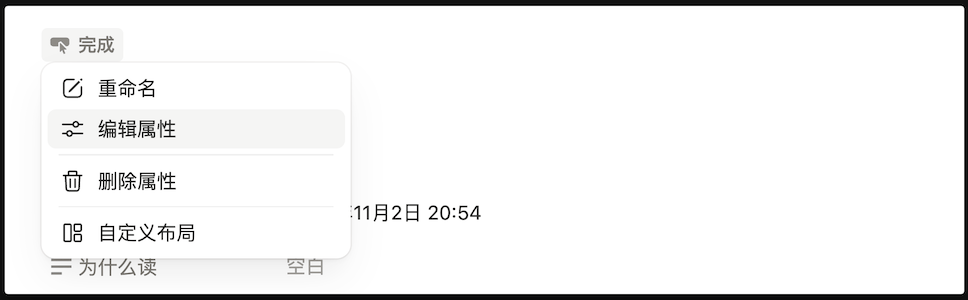
Then click "Edit property - Edit automation", then click where the error occurred
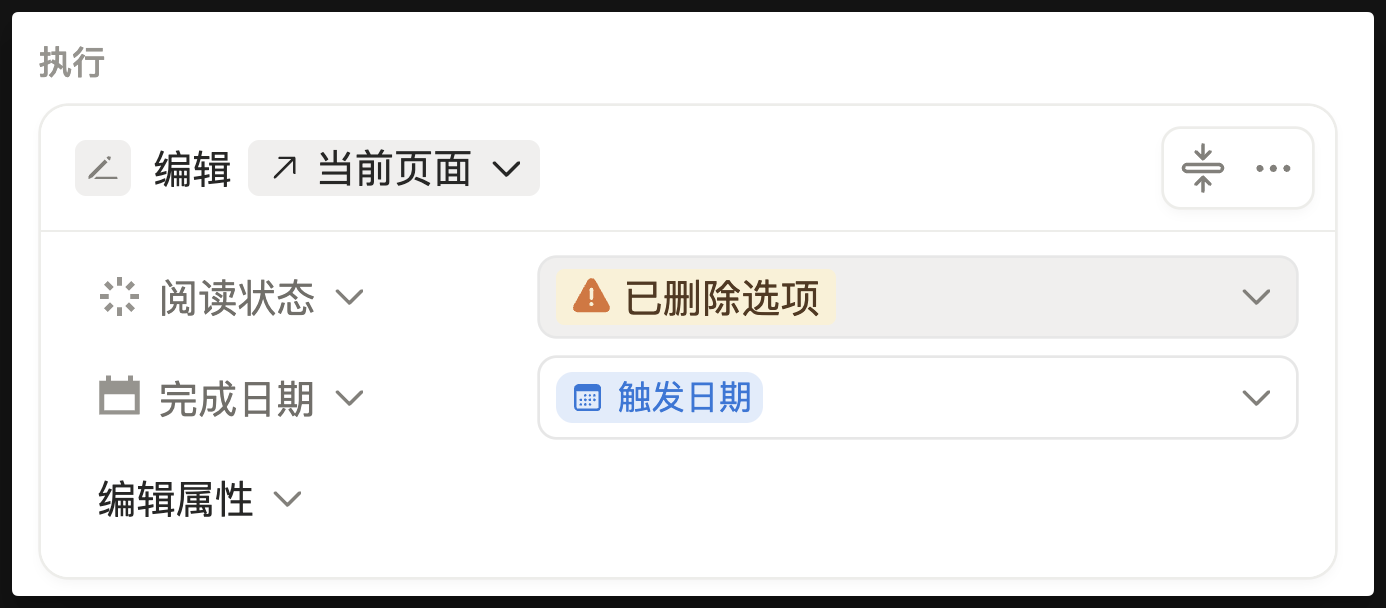
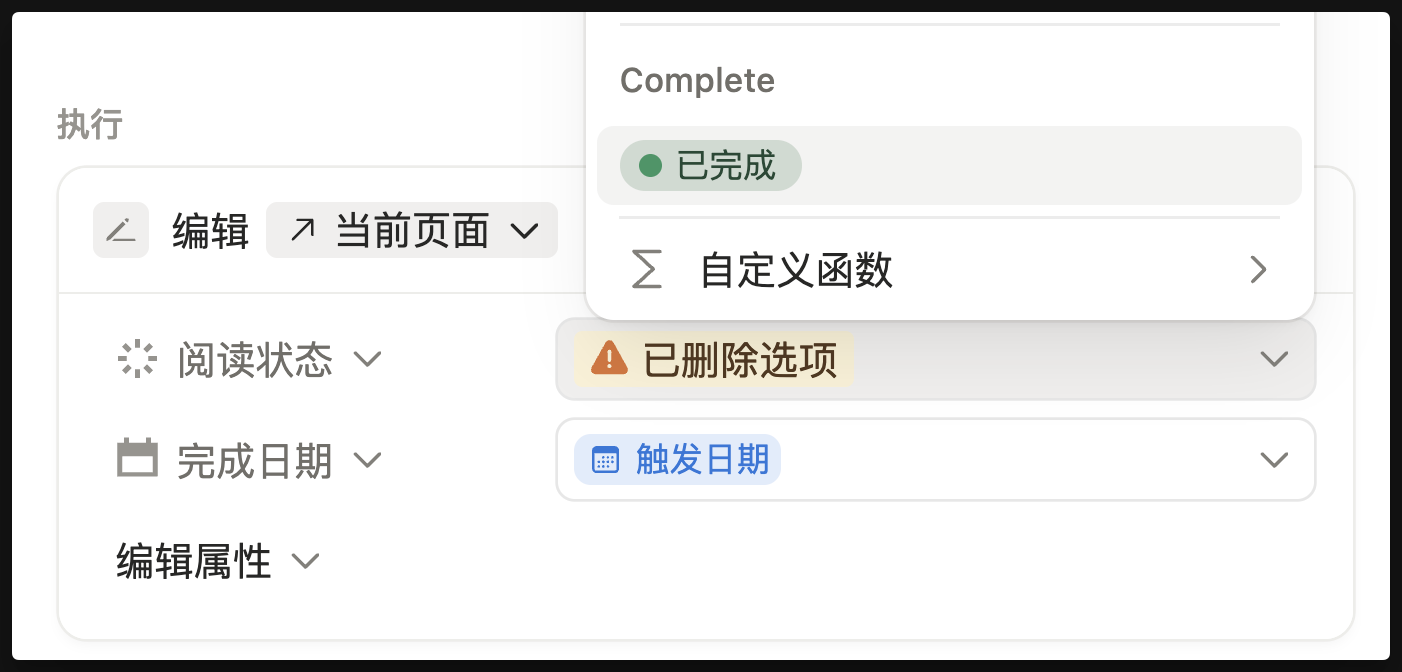
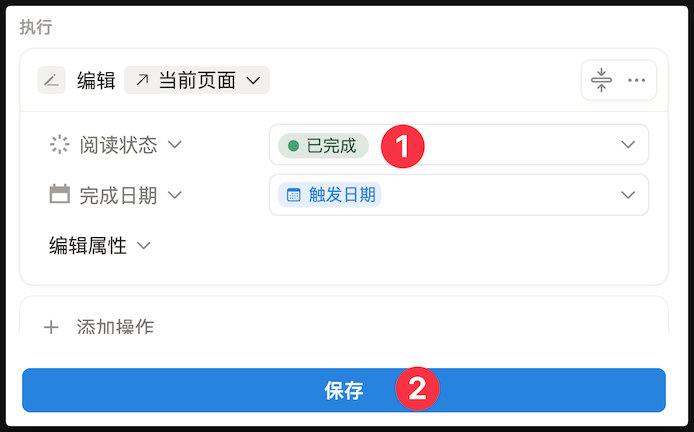
Change "Deleted option" to "Completed"
Finally click the save button
> **Applies to**: Users who copied the template before November 3, 2025. Templates copied after this date have this issue fixed.
**Issue Description**
When the month reaches November or December, the heatmap display won't align correctly, as shown below:
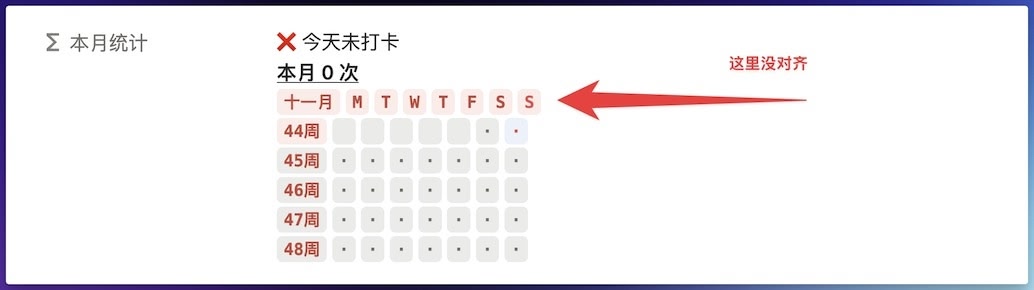
**Solution**
Copy the code below and replace the original code
```
/* ========== Check-in Statistics Board (Based on Current Month) - Integrated Habit Categories and Monthly Goals ========== */
lets(
/* --- Core Variables --- */
boardReferenceDate, now(), /* Board always based on current date and time */
currentYear, boardReferenceDate.formatDate("YYYY"), /* Current year string */
currentMonth, boardReferenceDate.formatDate("MM"), /* Current month string */
boardYearMonth, currentYear + "/" + currentMonth, /* Current year-month, e.g., "2025/05" */
/* --- Today's Check-in Status --- */
todayDateText, now().formatDate("YYYY/MM/DD"),
allRecords, prop("打卡记录"), /* All check-in records */
isCheckedInToday, allRecords.filter(current.prop("日期").formatDate("YYYY/MM/DD") == todayDateText).length() > 0,
todayCheckInStatusText, if(isCheckedInToday, "✅ 今天已打卡", "❌ 今天未打卡"),
habitCategory, prop("习惯分类"), /* Get habit category */
monthlyLimitTarget, prop("目标/上限"), /* Get monthly limit or target value */
/* Adjust markers and colors based on habit category */
triggerMark, if(habitCategory == "好习惯", "✓", "x"),
userDefinedColorForHabit, prop("习惯颜色"),
triggerColor, if(
habitCategory == "好习惯",
"green",
empty(userDefinedColorForHabit) ? "red" : userDefinedColorForHabit
),
/* --- 1. Calculate Monthly Trigger/Completion Count --- */
/* allRecords already defined above */
monthlyTriggers,
allRecords.filter(
current.prop("日期").formatDate("YYYY/MM") == boardYearMonth
).length(),
/* --- 2. Build First Row Habit Info String (Displayed for Both Good and Bad Habits) --- */
habitInfo,
lets(
baseText, format("本月 ") + monthlyTriggers + " 次",
actualSuffixText, /* Initialize suffix text */
if(empty(monthlyLimitTarget),
"", /* If no target/limit set, suffix is empty */
if(habitCategory == "好习惯",
lets(
neededForTarget, monthlyLimitTarget - monthlyTriggers,
if(neededForTarget <= 0,
"|已达标",
"|还需 " + format(neededForTarget) + " 次"
)
),
/* When it's a bad habit */
lets(
remainingCount, monthlyLimitTarget - monthlyTriggers,
if(remainingCount >= 0,
"|剩余 " + format(remainingCount) + " 次",
"|已超额 " + format(abs(remainingCount)) + " 次"
)
)
)
),
(baseText + actualSuffixText).style("b", "u") /* Combine and apply styles */
),
/* --- 3. Month and Week Headers --- */
monthHeader,
lets(
monthNum, boardReferenceDate.formatDate("MM").toNumber(),
monthText, if(monthNum >= 11,
boardReferenceDate.formatDate("MMM"), /* Nov/Dec use abbreviation */
boardReferenceDate.formatDate("MM") + "月" /* 1-10 use numbers */
),
monthText.style(
triggerColor + "_background", "c", "b", triggerColor
)
),
dayAbbreviations, ["M", "T", "W", "T", "F", "S", "S"],
weekHeader, dayAbbreviations.map(
lets(
dayAbbr, current,
dayIndex, index,
systemToday, now().day(),
isToday, (systemToday == 0 && dayIndex == 6) || (systemToday != 0 && systemToday - 1 == dayIndex),
dayAbbr.style(
triggerColor + "_background", "c", "b",
isToday ? ((triggerColor == "yellow" || triggerColor == "pink" || triggerColor == "green" || triggerColor == "gray") ? "brown" : "white") : triggerColor
)
)
).join(" "),
fullHeader, monthHeader + " " + weekHeader,
/* --- 4. Weekly Check-in Heatmap --- */
firstDayOfBoardMonth, parseDate(currentYear + "-" + currentMonth),
startDayOfWeekForBoardMonth, firstDayOfBoardMonth.day(),
week1StartDate, firstDayOfBoardMonth.dateSubtract((startDayOfWeekForBoardMonth + 6) % 7, "days"),
weekDaysOffsets, [0, 1, 2, 3, 4, 5, 6],
weekOffsetsForMap, [0, 7, 14, 21, 28, 35],
allWeekViewsRendered, weekOffsetsForMap.map(
lets(
daysToAdd, current,
currentWeekStartDate, week1StartDate.dateAdd(daysToAdd, "days"),
currentWeekIndex, index,
isThisWeekPotentiallyRelevant, currentWeekStartDate.formatDate("YYYY/MM") == boardYearMonth || currentWeekStartDate.dateAdd(6, "days").formatDate("YYYY/MM") == boardYearMonth,
displayThisWeek, (currentWeekIndex < 5) || (currentWeekIndex == 5 && isThisWeekPotentiallyRelevant),
weekViewContent, displayThisWeek ? (
(currentWeekStartDate.formatDate("WW") + "周").style(
currentWeekStartDate.formatDate("YYYY/WW") == now().formatDate("YYYY/WW") ? triggerColor + "_background" : "",
"c", "b", triggerColor
) + " " +
weekDaysOffsets.map(
lets(
dayOffset, current,
currentDayInGrid, currentWeekStartDate.dateAdd(dayOffset, "days"),
isCurrentDisplayMonth, currentDayInGrid.formatDate("YYYY/MM") == boardYearMonth,
dailyTriggersCount, isCurrentDisplayMonth ?
allRecords.filter(
current.prop("日期").formatDate("YYYY/MM/DD") == currentDayInGrid.formatDate("YYYY/MM/DD")
).length() : 0,
isActualToday, currentDayInGrid.formatDate("YYYY/MM/DD") == todayDateText, /* Use todayDateText for comparison */
(dailyTriggersCount > 0 ? triggerMark : (isCurrentDisplayMonth ? "·" : " ")).style(
dailyTriggersCount > 0 ? triggerColor + "_background" : (isActualToday && isCurrentDisplayMonth ? "blue_background" : ""),
"c", "b",
dailyTriggersCount > 0 ? triggerColor : (isCurrentDisplayMonth ? (isActualToday ? "white" : "gray") : "")
)
)
).join(" ")
) : "",
weekViewContent
)
).filter(current != "").join("\n"),
/* --- Build Monthly Target/Limit Text Line (for summary) --- */
monthlyTargetDisplayLine,
if(empty(monthlyLimitTarget),
"", /* If target/limit is empty, this line is empty */
if(habitCategory == "好习惯",
format("本月目标 ") + format(monthlyLimitTarget) + " 次",
format("本月上限 ") + format(monthlyLimitTarget) + " 次"
)
),
/* --- Calculate Last Month and Year Statistics (for summary) --- */
dateForLastMonth, boardReferenceDate.dateSubtract(1, "months"),
lastMonthYearMonth, dateForLastMonth.formatDate("YYYY/MM"),
lastMonthTriggers, allRecords.filter(
current.prop("日期").formatDate("YYYY/MM") == lastMonthYearMonth
).length(),
percentageChangeText, /* Adjust wording for "increase from 0" */
if(lastMonthTriggers == 0,
/* When last month was 0 times */
if(monthlyTriggers > 0,
"本月增加 " + format(monthlyTriggers) + " 次", /* Fixed: removed duplicate "last month 0" */
"无变化" /* If this month is also 0, no change */
),
/* When last month wasn't 0, calculate percentage */
lets(
diff, monthlyTriggers - lastMonthTriggers,
percentage, round(diff / lastMonthTriggers * 100),
if(percentage == 0,
"无变化",
if(percentage > 0,
"增加 " + format(percentage) + "%",
"下降 " + format(abs(percentage)) + "%"
)
)
)
),
lastMonthSummary, "上个月 " + format(lastMonthTriggers) + " 次|" + percentageChangeText,
thisYearTriggers, allRecords.filter(
current.prop("日期").formatDate("YYYY") == currentYear
).length(),
thisYearSummary, "今年总计 " + format(thisYearTriggers) + " 次",
/* --- 5. Final Assembly of All Parts --- */
finalOutput,
todayCheckInStatusText + "\n" +
habitInfo + "\n" +
fullHeader + "\n" +
allWeekViewsRendered + "\n\n" +
if(empty(monthlyTargetDisplayLine), "", monthlyTargetDisplayLine + "\n") +
lastMonthSummary + "\n" +
thisYearSummary + "\n",
finalOutput
)
```
> **Applies to**: Users who copied the template before November 2, 2025. Templates copied after this date have this issue fixed.
**Issue Description**
Open an article in the Web Clipper module, find the "Relation Property Last Edited Time" property, and clicking it shows an error like below:
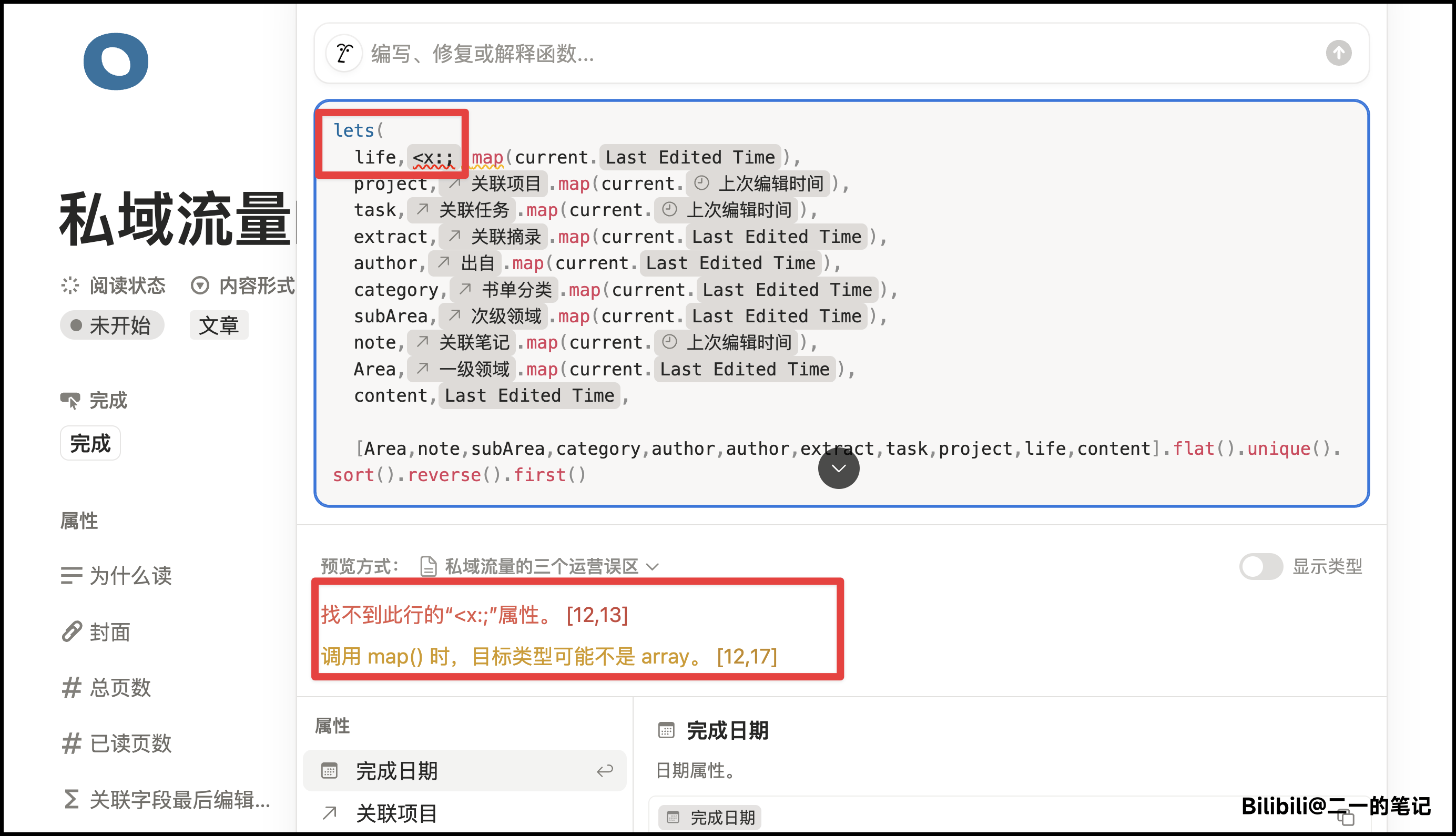
**Solution**
Copy the following code and completely replace the original
```
lets(
project,prop("关联项目").map(current.prop("上次编辑时间")),
task,prop("关联任务").map(current.prop("上次编辑时间")),
extract,prop("关联摘录").map(current.prop("Last Edited Time")),
author,prop("出自").map(current.prop("Last Edited Time")),
category,prop("书单分类").map(current.prop("Last Edited Time")),
subArea,prop("次级领域").map(current.prop("Last Edited Time")),
note,prop("关联笔记").map(current.prop("上次编辑时间")),
Area,prop("一级领域").map(current.prop("Last Edited Time")),
content,prop("Last Edited Time"),
[Area,note,subArea,category,author,author,extract,task,project,content].flat().unique().sort().reverse().first()
)
```
This change doesn't affect any functionality, it just removes unused code.
> **Applies to**: Users who copied the template before September 14, 2025. Templates copied after this date have this issue fixed.
**Issue Description**
In some cases, if you open a database and click the "Homepage" button at the top
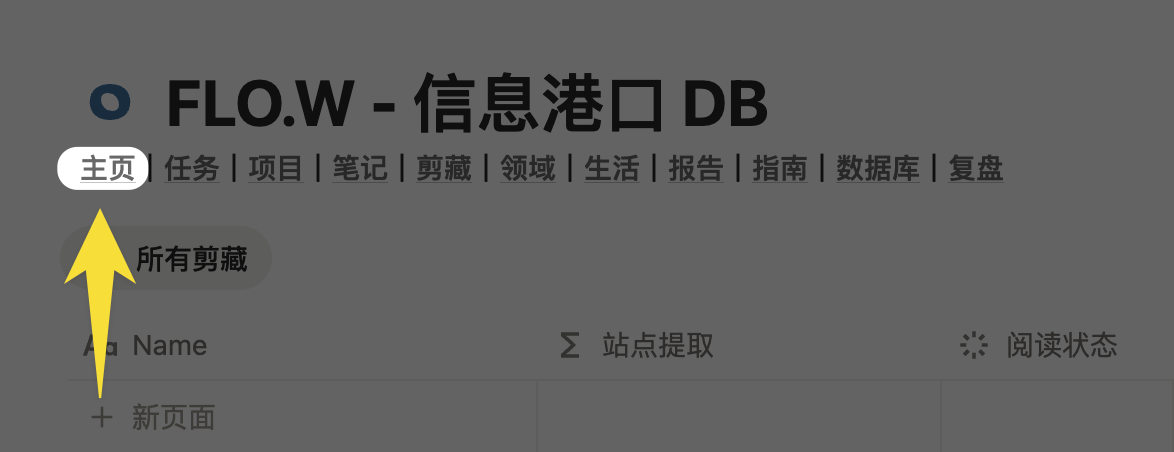 But it redirects to some webpage location
 **Solution**
**Method 1: Fix the Link**
Go to your template homepage, then use shortcut Ctrl+L (Mac users use Cmd+L) to copy the homepage link
**Solution**
**Method 1: Fix the Link**
Go to your template homepage, then use shortcut Ctrl+L (Mac users use Cmd+L) to copy the homepage link
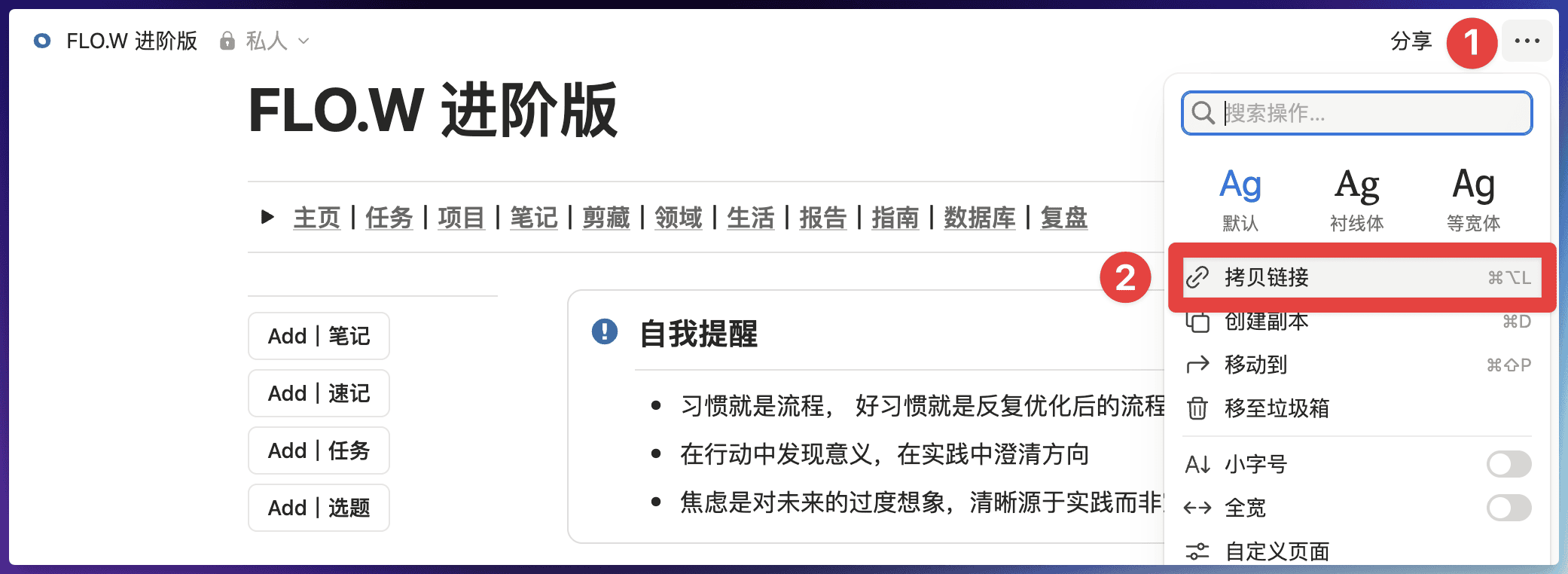 Return to the database page with the issue, then edit the "Homepage" button hyperlink
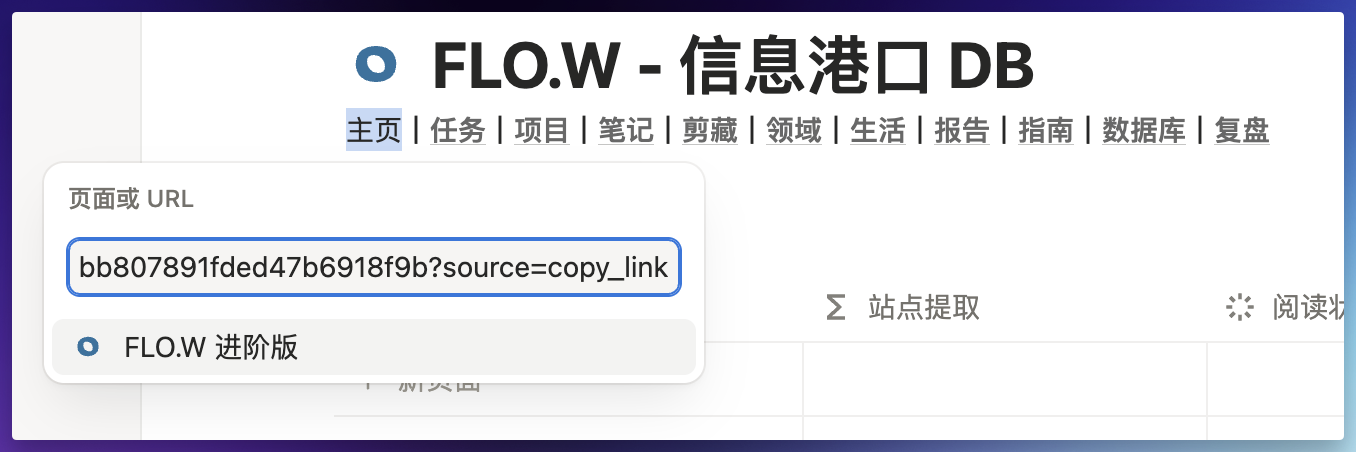
1. Hover over the word "Homepage"
2. Click the "Edit" button, a popup will appear
Return to the database page with the issue, then edit the "Homepage" button hyperlink
1. Hover over the word "Homepage"
2. Click the "Edit" button, a popup will appear
 In the "Page or URL" input field, paste the link from step 1, press Enter after pasting, then click the "Homepage" button and it will navigate to the correct homepage.
 **Method 2: Delete Navigation**
Since this navigation location is used infrequently, you can also directly delete the entire navigation string - it generally won't affect usage.
> **Applies to**: Users who copied the template before September 14, 2025. Templates copied after this date have this issue fixed.
**Issue Description**
In the "Life - Wishlist" module, there's an "Add to Purchased" button
**Method 2: Delete Navigation**
Since this navigation location is used infrequently, you can also directly delete the entire navigation string - it generally won't affect usage.
> **Applies to**: Users who copied the template before September 14, 2025. Templates copied after this date have this issue fixed.
**Issue Description**
In the "Life - Wishlist" module, there's an "Add to Purchased" button
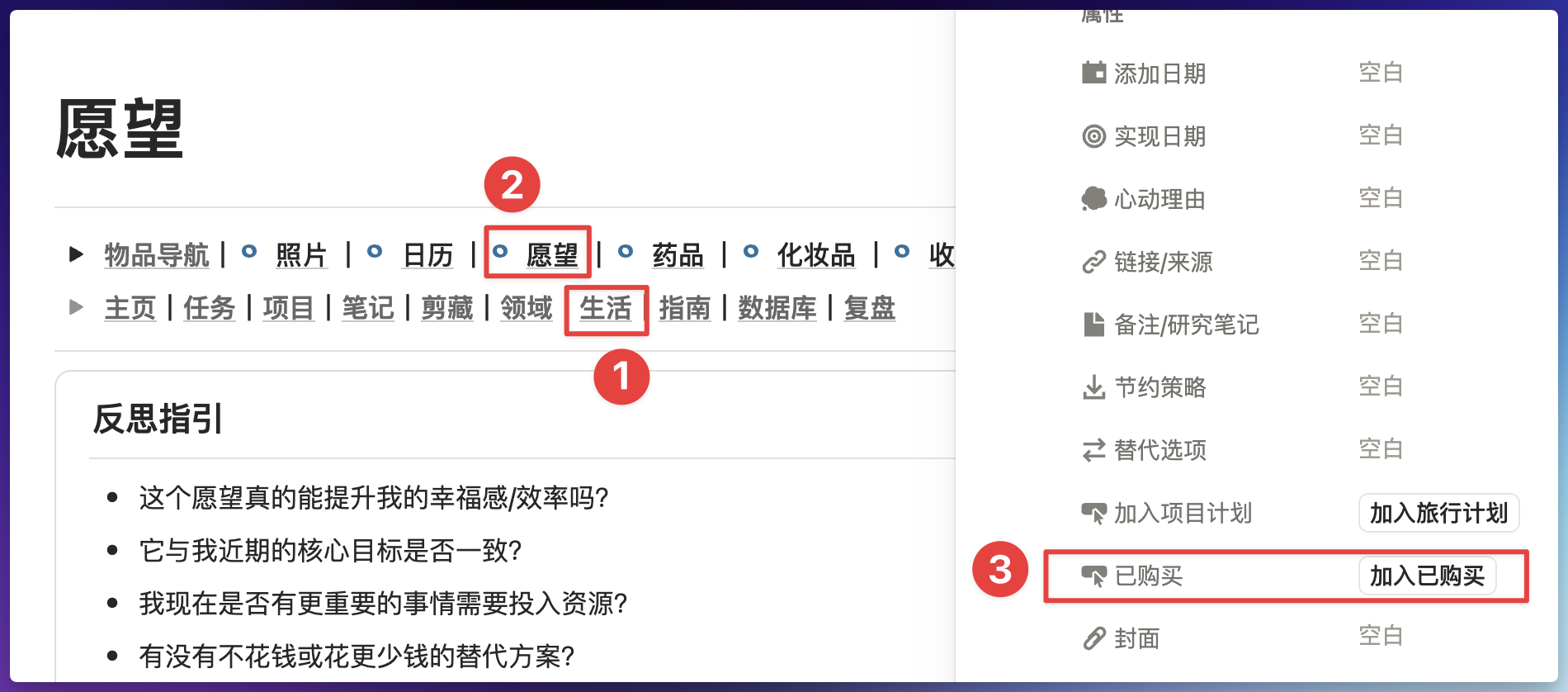 If clicking this button shows an error, one of the steps in this button might have an error
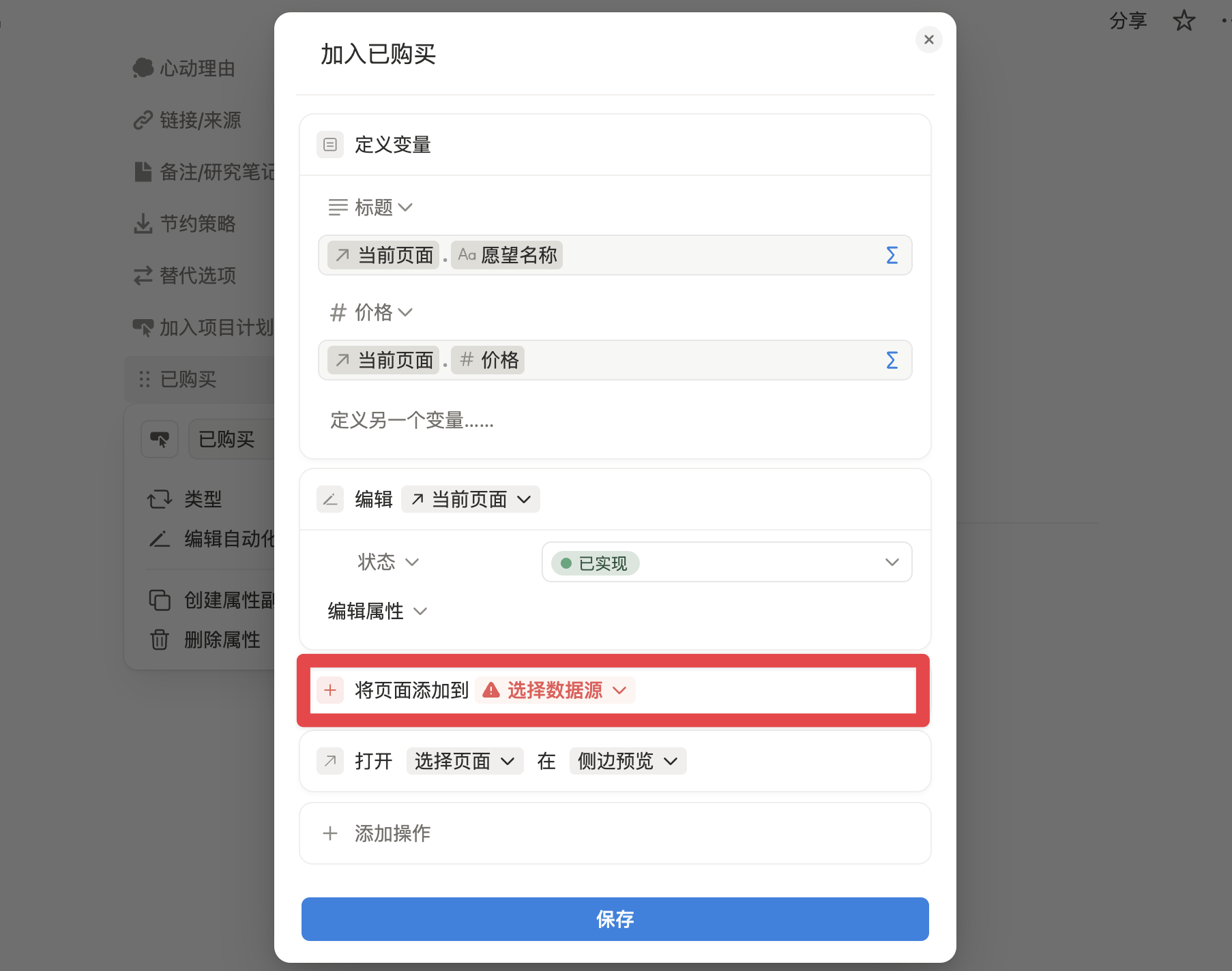 **Solution**
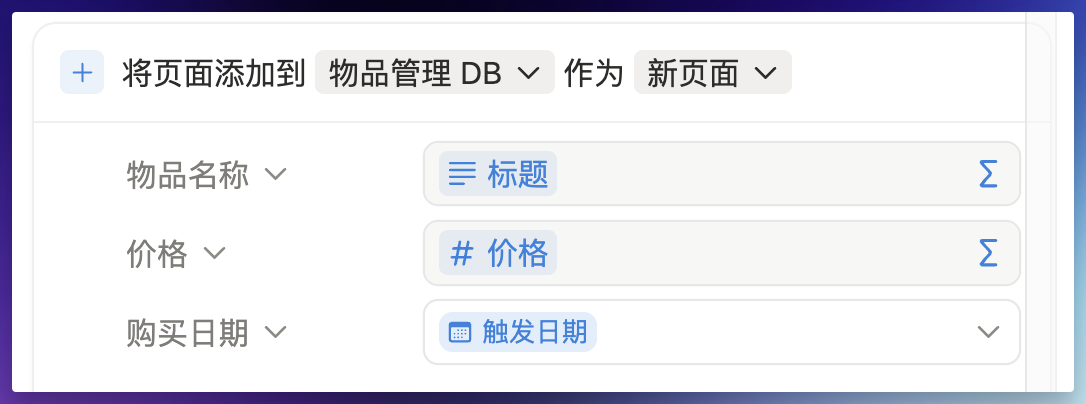
Re-edit this button following the method shown below
**Solution**
Re-edit this button following the method shown below
 ***
## Can't Access Notion?
If the Notion website or app suddenly becomes inaccessible, it might be a Notion service outage — not an issue with your network or template.
* Check the [Notion Status Page](https://www.notion-status.com/) to see if services are currently operational
* If it's not an official outage, refer to [Notion Access Speed Solutions](/docs/notion-download#notion-access-speed)
***
**Issue not resolved?** Join the [Lark Community](/docs/faq/support#join-feishu-group) for human support.
***
## Can't Access Notion?
If the Notion website or app suddenly becomes inaccessible, it might be a Notion service outage — not an issue with your network or template.
* Check the [Notion Status Page](https://www.notion-status.com/) to see if services are currently operational
* If it's not an official outage, refer to [Notion Access Speed Solutions](/docs/notion-download#notion-access-speed)
***
**Issue not resolved?** Join the [Lark Community](/docs/faq/support#join-feishu-group) for human support.