# System Design Philosophy (https://21notion.com/en/docs/faq/system-design)

import { Accordion, Accordions } from 'fumadocs-ui/components/accordion';
import { Steps, Step } from 'fumadocs-ui/components/steps';
import { Card, Cards } from 'fumadocs-ui/components/card';
import { BlogCTA } from '@/components/blog/blog-cta';

This page explains the core design philosophy of the FLO.W template, helping you understand "why things are designed this way" for better template usage.

<BlogCTA title="📖 FLO.W Design Intent" description="Understand why FLO.W is designed this way — the product philosophy and information architecture behind it." highlights={[]} buttonText="Read Design Intent" href="/flow/design-philosophy" variant="minimal" />

<Cards>
  <Card title="Understanding Areas" href="/docs/basic-feature/area" />
</Cards>

## Meta Information Architecture

<Accordions type="single">
  <Accordion title="Why are Task and Project databases created separately?" id="task-project-database">
    **Reader's Question:**
    Why not merge the Project database with the Task database? Databases already have sub-task functionality, allowing nesting within the same database - theoretically no need for a second database. Is it because the Task database would become too complex? Or are there formula or property conflicts?

    **My Answer:**
    This question can also be asked as: why aren't the Area and sub-Area databases merged? Or whenever you wonder "why aren't A and B databases combined?", you can refer to the answer below. You'll also learn some of my thinking behind designing this template.

    <Steps>
      <Step>
        <h4>
          Reason 1: Meta Information
        </h4>

        <p>
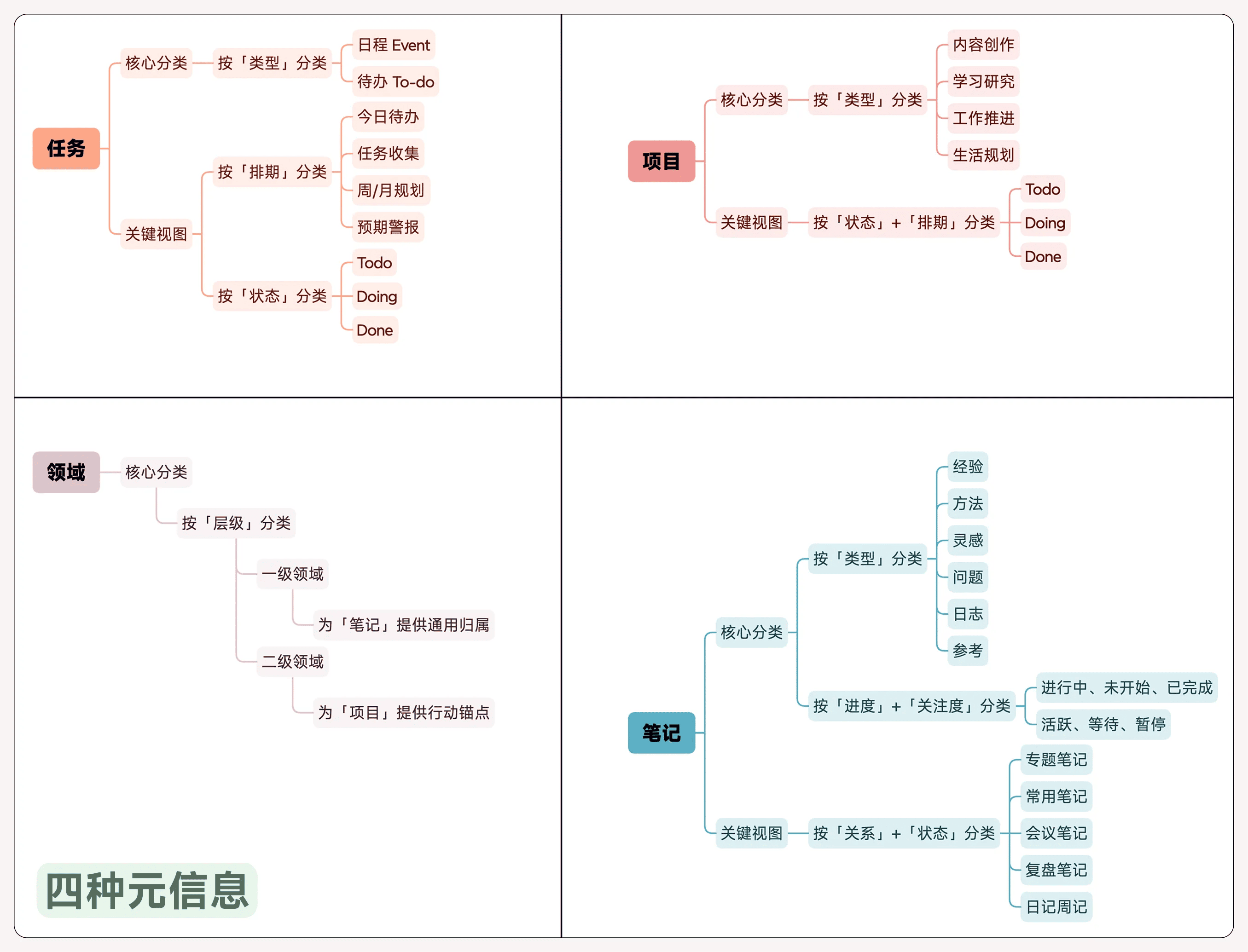
          First, the FLO.W system is built on 4 types of meta information. Understanding "meta information" is key to answering this question. I highly recommend reading the article below and searching for the keyword "limited types of meta information".
        </p>

        <p>
          Article link: 

          <a href="/blog/notion-7-year-reflection">Reconsidering Notion: My 7-Year Reflection</a>
        </p>

        <img src="https://pic.eryinote.com/PicGo/202509130133919.png" alt="Meta information diagram" />

        <p>
          <strong>Project:</strong>
        </p>

        <ul>
          <li>
            Is a goal container, representing an outcome that requires multiple steps to achieve, with a clear beginning and end
          </li>

          <li>
            Its purpose is "defining direction" and "measuring progress", so its core properties are strategic ones like "Progress Bar", "Project Duration", "Associated Area"
          </li>
        </ul>

        <p>
          <strong>Task:</strong>
        </p>

        <ul>
          <li>
            Is an action unit, representing a specific action that can be started immediately
          </li>

          <li>
            Its purpose is "driving execution". So its core properties are execution-oriented ones like "Next Action", "Schedule Date", "Status"
          </li>
        </ul>

        <p>
          Different databases serve as different information containers, defining information types and flow directions through mutual relations. This is detailed in the article above - if you have time, I recommend reading it to systematically understand the template's construction logic.
        </p>
      </Step>

      <Step>
        <h4>
          Reason 2: Property Confusion
        </h4>

        <p>
          Based on the meta information definition, Task and Project databases must be independent, otherwise properties would mix together, requiring each property to carry two sets of usage logic. A specific "task" entry would show invalid properties like "Project Progress Bar"; a "project" entry would show execution properties like "Next Action".
        </p>

        <p>
          This would make the database bloated and chaotic, and increase workload when recording, requiring repeated scrolling to find the appropriate property.
        </p>
      </Step>

      <Step>
        <h4>
          Reason 3: Sub-task Views Aren't Flexible
        </h4>

        <p>
          If Tasks were placed as sub-items under Projects, based on my long-term practical experience, you'd inevitably encounter many "view filtering" problems in the future.
        </p>
      </Step>

      <Step>
        <h4>
          Reason 4: Formula Statistics
        </h4>

        <p>
          Currently both Tasks and Projects have their own formula statistical reports. They must be stored in separate databases for formula statistics to work properly, reducing complexity and performance overhead during calculations.
        </p>

        <p>
          Formula statistics reference: 

          <a href="https://leon21.notion.site/2200e68aa046808aaa86ebd2f45fa07f?v=2200e68aa04680ce9657000c1e713a40&source=copy_link">Click here</a>
        </p>
      </Step>
    </Steps>
  </Accordion>

  <Accordion title="How to manage tasks without a project" id="task-without-project">
    **Question**: My daily work is quite fragmented and doesn't fit into any specific project, but it belongs to a specific work area. How can I better manage these tasks?

    **Recommended Method**:

    1. Create a project called "June Work Summary"
    2. Link all fragmented tasks this month to this project
    3. Link this project to a specific sub-Area
    4. Achieve the following hierarchy:
       * sub-Area XXX
         * 202506 - Work Summary
           * Fragmented Task 1
           * Fragmented Task 2
  </Accordion>
</Accordions>

## Area Design

<Accordions type="single">
  <Accordion title="How to record notes without an area assignment" id="unassigned-notes">
    **Question**

    I often encounter notes that don't belong to any currently established area, but are worth keeping. Creating a separate area for them isn't worthwhile, but without an area I lose a dimension of classification. What should I do?

    **Answer**

    In the FLO.W system's Area module, I've kept an "Unassigned Notes" view that filters all notes without an Area or sub-Area set. This way you can collectively review notes without areas set and see if they share any commonalities. If so, perhaps you can create an Area or sub-Area for these notes.
    ![FLO.W area expertise navigation, showing various views and function modules related to areas](https://pic.eryinote.com/PicGo/202509130216987.png)
    So if you think this module should be visible, you can directly @ this page in the navigation bar. (Method reference @navigation bar video complete guide)
  </Accordion>

  <Accordion title="Why areas can't expand infinitely" id="area-limit">
    **Question**
    The template has Areas and sub-Areas. How do I create third and fourth level areas?

    **Answer**
    The template adopts a two-tier structure of "Area" and "sub-Area" in the Area module through careful design. The purpose is to establish the clearest, most efficient connection between "macro strategy" and "specific action". Before considering adding more levels, understanding the design intent is crucial.
    First you need to read [Understanding Areas](/docs/basic-feature/area), then continue reading below.

    Adding unlimited third and fourth level areas easily leads to bloated management structures, increased decision burden, and may cause information to become fixed in corners, violating the core concept of information flow. When classification finer than sub-Area is needed, we don't recommend directly creating new database levels. Instead, choose one of these two paths that better fit system logic based on the nature of what you're organizing.

    <Accordions type="single">
      <Accordion title="Path 1: If it's a 'goal with beginning and end', turn it into a Project" id="turn-to-project">
        When the essence of an idea is "to complete something specific", it's better suited as a project.

        * **Example Scenario**:
          Under Area "Career Development" and sub-Area "Data Analysis Skills", you want to start learning Python. Don't create a third-level area "Python Learning".
        * **Recommended Action**:
          In the `Project Management` database, create a new project called "Learning - Python Basics" and link it to sub-Area "Data Analysis Skills".
        * **Core Advantage**:
          Projects naturally have goals and timelines, driving task breakdown and execution, forming action loops. After project completion and archiving, the area structure stays clean and strategic long-term.
      </Accordion>

      <Accordion title="Path 2: If it's a 'knowledge topic requiring long-term accumulation', turn it into a Topic Note" id="turn-to-subject">
        When the essence of an idea is "a long-term continuous direction", it's better suited as a project.

        When the essence of an idea is "requiring deep organization of a specific knowledge domain", it's better suited as a core node in a knowledge network.

        * **Example Scenario**:
          Under Area "Personal Mental Growth", you've developed deep interest in "Stoic Philosophy" and want to systematically organize it.
        * **Recommended Action**:
          1. In the `Note Management` database, create a note called "Topic: Stoic Philosophy Research".
          2. Link this note to Area "Personal Mental Growth".
          3. All more specific notes on this topic (like reading notes, personal reflections) are linked to this "Topic Note" through "Parent/Child" relationships.
        * **Core Advantage**:
          Building knowledge networks with notes as core is more flexible and lightweight than creating rigid hierarchies. The topic note page itself becomes the thinking center and index directory for that subject.
      </Accordion>

      <Accordion title="Decision Path Overview" id="strategy">
        \| --- | --- | --- |
        \| Something with **clear goals that can be completed in a period of time** | Define it as a **`Project`** | Define goals with **action** |
        \| A knowledge topic **requiring long-term learning and accumulation** | Create it as a **`Topic Note`** | Organize knowledge with **knowledge** |
      </Accordion>
    </Accordions>
  </Accordion>

  <Accordion title="Why principles are notes rather than areas" id="principle-note">
    **Community Reader's Question**

    > I have some personal principles I want to practice long-term, and I want to create a project to continuously improve them. I feel they should belong under the Area "Personal Growth", but it also feels like a sub-Area. How should I organize it to build the hierarchy of `Personal Growth -> Practicing Principles -> Principle Improvement Project -> Specific Tasks`?

    **My Answer**

    **I. Areas are rooms, Notes are books**

    Before starting operations, we need to establish a concept:

    * **Area is a "room"**: It represents a long-term responsibility area of your life, a space you need to continuously maintain and invest in, like a study (personal growth), kitchen (health management). It's structure, it's a container.
    * **Note is a "book" or "tool"**: It represents specific knowledge, information, methodologies, reference materials. Your "personal principles" are a "life guidebook" that needs to be repeatedly read and revised. It's content, it's substance.

    The core confusion in the reader's question is **trying to treat a "book" as a "room"**.

    **II. The Wrong Approach: Forcing Hierarchy**

    If we follow traditional folder hierarchy thinking, we'd try to build a seemingly reasonable hierarchy chain like the questioner:

    * Area: Personal Growth (room)
      * sub-Area: Practicing Principles (trying to make a book into a small room)
        * Project: Improve Personal Principles
          * Tasks...

    The problem with this structure is that "Practicing Principles" itself doesn't have Area characteristics - it doesn't have independent, long-term investment goals. It itself is "content" that needs to be referenced. Forcing it as a sub-Area makes your area structure contain both rooms and books, creating confusion.

    **III. FLO.W's Solution**

    <Steps>
      <Step title="Correctly categorize 'Principles' as Notes">
        "Practicing Principles" is highly condensed wisdom, SOPs that guide your actions - this is exactly what the Notes database exists for.

        1. Enter the `Note Management` database
        2. Create a new note titled "My Personal Practicing Principles"
        3. Inside this note page, write down each of your principles in detail
        4. Link this note to the Area "Personal Growth"

        Now, your "book" is in the correct "room".
      </Step>

      <Step title="Use Relations to connect Projects and Notes">
        Now you can create a project for the goal "Improve Principles" and create linkage with the principles note you just created.

        1. Enter the `Project Management` database
        2. Create a new project, for example: "Q4 Personal Principles Review and Iteration"
        3. Link this project to sub-Area "Personal Mental Model Building" (or another sub-area you've defined)
        4. **The key step**: In this project's "Related Notes" property, find and link your note "My Personal Practicing Principles"

        This way, we've built a new, more powerful structure:

        * **Area:** Personal Growth
          * **sub-Area:** Personal Mental Model Building
            * **Project:** Q4 Personal Principles Review and Iteration
              * **Related Note** **\[My Personal Practicing Principles]**
              * **Task:** 1. Review last quarter's principle execution...

        The Principles note is no longer a rigid link in a hierarchy chain, but like an external knowledge USB drive, flexibly plugged into projects that need it.
      </Step>
    </Steps>

    **Benefits of this approach:**

    * **Clear structure**: Your Area structure always only stores responsibility areas, maintaining strategic purity
    * **Highly flexible**: The same "principles" note can be linked and reused by multiple different projects in the future - "Annual Planning Project", "Relationship Review Project" - truly achieving knowledge flow

    When you encounter a new concept and are unsure how to organize it, ask yourself: Is it a "place" I need to be responsible for long-term, or a "thing" I need to reference or act on?

    * If it's a "place", it should be an Area
    * If it's a "thing", it's likely a Note or a Project
  </Accordion>
</Accordions>

***

**Want to learn more?** Read [FLO.W Design Intent](/flow/design-philosophy) or [Reconsidering Notion: My 7-Year Reflection](/blog/notion-7-year-reflection).